AWS Explained: From Account Setup to Scalable Cloud Infrastructure
Cloud computing can look complicated when dozens of services, networking concepts, security settings, and configuration screens appear at once. Amazon Web Services (AWS) becomes much easier to understand when the platform is viewed as a process rather than a collection of unrelated products.
A typical AWS project starts with an account and identity controls, moves into architecture and networking, creates compute and storage resources, adds databases where necessary, and then introduces monitoring, security, scaling, and cost management.
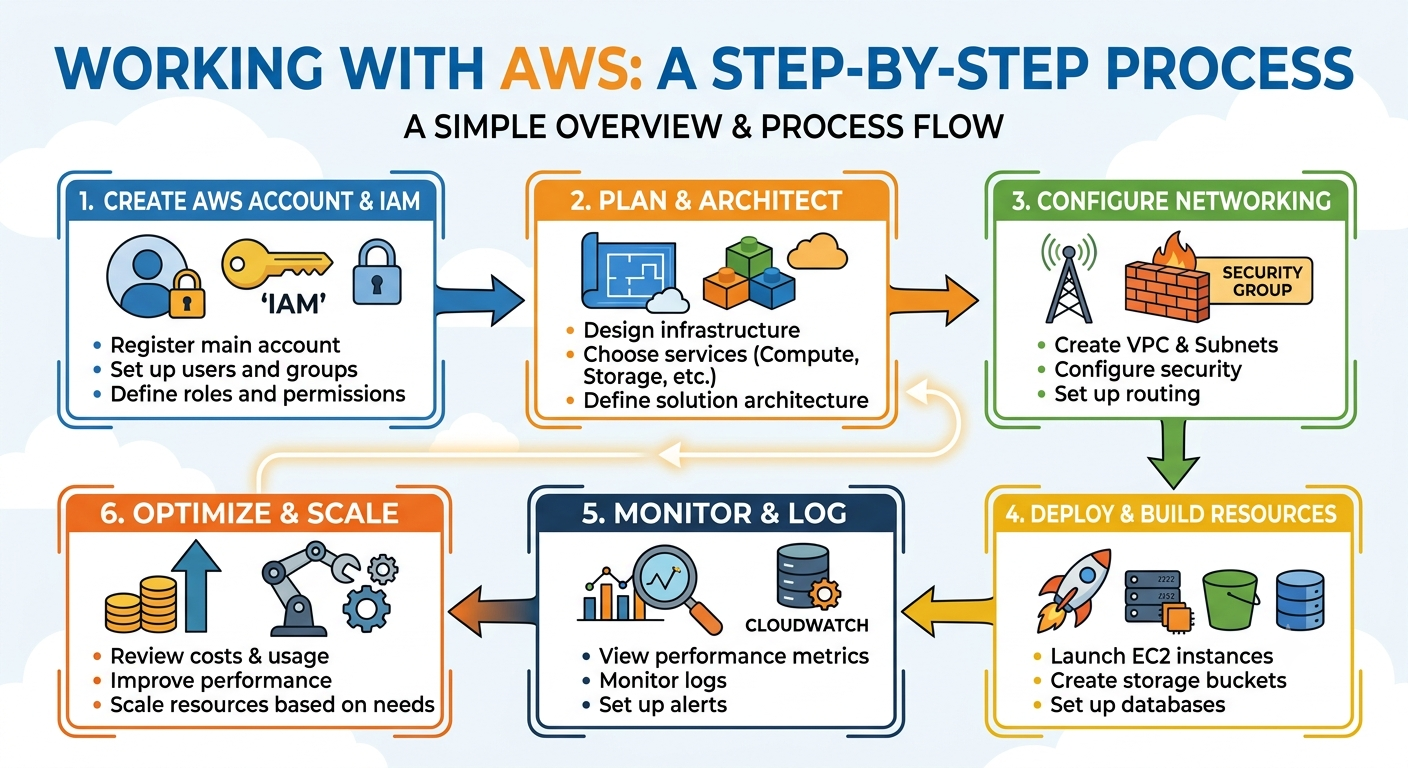
That is the journey illustrated in the accompanying KnowledgeBoost flow diagram:
Create AWS Account & IAM → Plan & Architect → Configure Networking → Deploy Resources → Monitor & Log → Optimize & Scale
This guide explains that journey in practical terms. It is useful for beginners learning AWS, students working on cloud computing assignments, developers building applications, and anyone looking for a clearer understanding of how an AWS environment fits together.
Important: AWS is not simply a place to launch a virtual machine. It is an ecosystem for designing, securing, deploying, monitoring, and scaling complete computing systems.
1. What Is AWS?
Amazon Web Services (AWS) is a cloud computing platform that provides on-demand infrastructure and managed services over the internet.
Instead of purchasing physical servers, installing networking equipment, maintaining storage hardware, and operating data centers, an organization can provision many of these capabilities through AWS.
AWS provides services across areas such as:
- Compute
- Storage
- Databases
- Networking
- Identity and access management
- Security
- Monitoring
- Analytics
- Containers
- Serverless computing
- DevOps
- Machine learning
The important idea is that AWS separates the application from much of the physical infrastructure underneath it.
For example, a traditional application might require:
Server → Storage → Network → Database → Backup → Monitoring
In AWS, these capabilities can be assembled from managed services. A simple web application might use an EC2 instance for compute, an S3 bucket for object storage, an RDS database for relational data, a VPC for networking, IAM for permissions, and CloudWatch for monitoring.
This is why learning AWS is less about memorizing service names and more about understanding how services work together.
2. Step One: Create an AWS Account and Set Up IAM
The first stage of an AWS environment is identity.
The AWS account provides the boundary in which resources are created. But using the root account for everyday administration is not a good operational pattern. AWS Identity and Access Management, commonly called IAM, provides mechanisms for controlling who can access what.
What is IAM?
IAM allows administrators to manage:
- Users
- Groups
- Roles
- Policies
- Permissions
A permission policy can specify which actions a principal is allowed or denied.
For example, an application might need permission to read objects from an S3 bucket without needing permission to delete them.
That leads to a fundamental cloud security principle:
Give each identity only the permissions it actually needs.
This is known as the principle of least privilege.
IAM users, groups, roles and policies
An IAM user represents an identity that can authenticate to AWS.
An IAM group can collect users with similar permissions.
An IAM role provides temporary permissions that can be assumed by trusted identities or AWS services. Roles are especially important when applications running on AWS need to interact with other AWS services.
An IAM policy defines permissions.
A simplified conceptual flow looks like:
Identity → Policy → Allowed AWS Actions → AWS Resource
IAM is one of the most important concepts for both real-world AWS environments and academic cloud computing assignments because security is part of architecture, not something added at the end.
3. Step Two: Plan and Architect Before Deploying
One of the most common beginner mistakes is opening the AWS console and immediately launching resources. A better approach is:
Understand the requirement → design the architecture → select services → configure infrastructure → deploy
Before creating anything, ask:
- What problem is the application solving?
- Who will use it?
- What components are required?
- Where should each component run?
- What data needs to be stored?
- What needs to communicate with what?
- What must be publicly accessible?
- What should remain private?
- What happens if traffic increases?
- How will the system be monitored?
Example: a simple web application
Imagine a web application that allows users to submit information through a browser.
A basic architecture could contain:
User → Web Application → Application Server → Database
AWS services can map onto these requirements:
- VPC: network boundary
- EC2: application compute
- RDS: relational database
- S3: object/file storage
- IAM: permissions
- CloudWatch: monitoring
The exact architecture depends on the requirements. There is no universal AWS architecture that is correct for every project.
5. Step Four: Configure Networking with Amazon VPC
If AWS architecture is the house, the Virtual Private Cloud (VPC) is much of the surrounding property and road system.
An Amazon VPC provides a logically isolated network in which AWS resources can be placed.
Understanding VPCs is essential for anyone studying AWS networking.
What is a VPC?
A VPC defines a network environment using concepts such as:
- CIDR ranges
- Subnets
- Route tables
- Internet gateways
- NAT gateways
- Security groups
- Network ACLs
A VPC might use an address range such as:
10.0.0.0/16
That range can then be divided into smaller subnets.
Public and private subnets
A public subnet generally contains resources that need a route to an internet gateway.
A private subnet does not directly expose resources to the public internet through an internet gateway.
A common architecture is:
Internet → Public Load Balancer → Private Application Resources → Private Database
This is generally more secure than placing the database directly on the public internet.
Route tables
Route tables determine where network traffic should go.
For example, a public subnet may have a route resembling:
0.0.0.0/0 → Internet Gateway
A private subnet may instead route appropriate outbound traffic through a NAT gateway.
The exact design depends on requirements, but the central concept is simple:
A subnet's route table determines how traffic is routed.
6. Security Groups and Network Controls
AWS networking and AWS security are closely connected.
A security group acts as a virtual firewall associated with supported AWS resources.
Security groups control inbound and outbound traffic using rules such as:
- Protocol
- Port
- Source or destination
For example:
- HTTP: port 80
- HTTPS: port 443
- SSH: port 22
- PostgreSQL: port 5432
- MySQL: port 3306
A common mistake is opening every port to every IP address.
A better design asks:
Which system actually needs to communicate with this resource?
For example, a database security group might permit database traffic only from an application server's security group rather than from the entire internet.
This distinction is particularly important in an AWS VPC assignment, AWS networking assignment, or cloud infrastructure assignment.
7. Step Five: Deploy Compute with EC2
Once networking is ready, compute resources can be deployed.
Amazon EC2 (Elastic Compute Cloud) provides virtual servers that can run applications and operating systems.
When launching an EC2 instance, several decisions are involved:
- Operating system
- Instance type
- CPU and memory requirements
- Storage
- Network placement
- Security group
- Authentication method
- IAM role
- Monitoring
- Scaling requirements
The correct EC2 instance is determined by workload requirements rather than simply choosing the largest machine.
EC2 is more than "a virtual machine"
An EC2 deployment involves several connected components.
For example:
VPC → Subnet → Security Group → EC2 Instance → Application
This is why an EC2 assignment often becomes a networking assignment as well.
If an EC2 instance cannot be reached, the problem may not be the operating system. It could be:
- Incorrect subnet
- Missing route
- Incorrect security group rule
- Missing internet gateway
- Incorrect network interface configuration
- Authentication problem
Learning AWS effectively means learning to troubleshoot the entire chain.
9. Step Seven: Add Databases with Amazon RDS
Most useful applications need persistent data.
Amazon RDS (Relational Database Service) is a managed database service that supports relational database engines.
Instead of manually handling every aspect of database infrastructure, a managed service can simplify tasks such as provisioning, backups, patching, and operational administration, depending on the configuration and database engine.
Common relational database choices include engines such as:
- PostgreSQL
- MySQL
- MariaDB
- Microsoft SQL Server
- Oracle
A typical web architecture might therefore look like:
Client → Application → RDS
The database should normally be placed in a network configuration that limits unnecessary exposure.
A good architecture does not ask only:
"Where can the database run?"
It asks:
"Who needs access to the database, through which path, and why?"
10. Step Eight: Monitor with Amazon CloudWatch
Deployment is not the end of an AWS project.
Once resources are running, the next question is:
How do we know whether the system is healthy?
This is where monitoring becomes essential.
Amazon CloudWatch provides monitoring and observability capabilities for AWS resources and applications.
Depending on the service and configuration, CloudWatch can help with:
- Metrics
- Logs
- Alarms
- Dashboards
- Operational visibility
For example, an administrator might monitor:
- CPU utilization
- Network activity
- Application logs
- Error patterns
- Request-related metrics
An alarm can then be configured to respond to a defined condition.
Monitoring turns an infrastructure deployment from something that is merely "running" into something that can be observed and managed.
11. Logging and Troubleshooting
Logs are particularly important when something goes wrong.
Suppose a web application suddenly returns errors.
Possible causes could include:
- Application failure
- Database connectivity problem
- Network configuration issue
- Authentication failure
- Resource exhaustion
- Incorrect deployment
- Dependency failure
Without logs and useful metrics, troubleshooting becomes guesswork.
A practical troubleshooting approach is to move through the architecture systematically:
Client → DNS/load balancing → Network → Security → Compute → Application → Database
Instead of changing random settings, identify where the request fails.
This approach is useful for both professional cloud operations and AWS lab assignments, because it demonstrates understanding rather than simply following a deployment checklist.
12. Optimize and Scale
A successful AWS system must balance:
Performance + Reliability + Security + Cost
Scaling means increasing or decreasing resources according to workload.
There are two basic forms.
Vertical scaling
Increase the capacity of an individual resource.
For example:
Smaller EC2 instance → Larger EC2 instance
Horizontal scaling
Increase the number of resources.
For example:
1 application instance → 3 application instances
Horizontal scaling is particularly useful when workloads need resilience and the application can distribute requests across multiple instances.
Scaling decisions should be based on actual requirements and observed behavior rather than assumptions.
13. AWS Cost Optimization
Cloud computing changes the economics of infrastructure.
Instead of buying hardware upfront, organizations often pay for resources based on usage and configuration.
That flexibility can be powerful, but it can also create unexpected costs.
Common cost-control practices include:
- Remove unused resources
- Review storage
- Monitor compute usage
- Choose suitable instance types
- Avoid unnecessary public infrastructure
- Review data transfer
- Set budgets and alerts
- Shut down temporary lab resources
- Use appropriate pricing models where applicable
This is especially important for students performing AWS practical work. A forgotten resource can continue consuming billable capacity after the experiment is finished.
A strong AWS cloud computing assignment should therefore discuss not only how a system works, but also why the chosen architecture is economically sensible.
14. Security Should Exist Across the Entire Architecture
Security is not one AWS service.
It is a layer that crosses the entire system.
Consider the architecture:
IAM → VPC → Security Groups → EC2 → S3 → RDS → CloudWatch
Each layer presents different security questions.
Identity
Who can access AWS?
Network
Which systems can communicate?
Compute
How is the operating system and application secured?
Storage
Who can read or modify data?
Database
Which applications can connect?
Monitoring
How are suspicious or unexpected activities detected?
This layered approach is often called defense in depth.
A strong AWS architecture assumes that no single security control is sufficient by itself.
15. A Complete AWS Workflow
The six-stage diagram can now be understood as one continuous engineering process.
Stage 1 — Create AWS Account & IAM
Start by establishing the AWS environment and controlling identities, roles, and permissions.
Stage 2 — Plan & Architect
Understand the application requirements and choose appropriate AWS services.
Stage 3 — Configure Networking
Create the VPC, subnets, routes, gateways, and security controls.
Stage 4 — Deploy & Build Resources
Launch compute resources and configure storage, databases, and applications.
Stage 5 — Monitor & Log
Collect metrics and logs, create useful dashboards and alarms, and troubleshoot problems.
Stage 6 — Optimize & Scale
Review performance, reliability, security, and cost. Adjust resources as the workload changes.
The important insight is that these stages are connected.
For example:
An EC2 problem might actually be a VPC problem.
A database problem might actually be a security-group problem.
A performance problem might actually require architectural scaling.
A cost problem might require a resource-lifecycle review.
Cloud engineering therefore requires systems thinking.
16. AWS Assignment Help: What Students Should Actually Understand
AWS is increasingly common in university projects, cloud computing courses, networking labs, DevOps modules, and software engineering assignments.
Searches such as AWS Assignment Help, AWS project help, AWS cloud computing assignment help, AWS lab assignment help, and AWS infrastructure assignment help often point to the same underlying challenge: understanding how individual AWS services fit into an architecture.
For an academic AWS project, the strongest approach is not to document only the clicks performed in the AWS Console.
A better report explains:
- The problem being solved
- The architecture
- Why each AWS service was selected
- The network design
- Security decisions
- Data-storage choices
- Deployment process
- Monitoring strategy
- Scaling considerations
- Cost considerations
That transforms an AWS practical exercise into an engineering explanation.
17. VPC Assignment Help: A Simple Way to Think About VPC Design
VPC Assignment Help is often needed because networking concepts can initially seem abstract.
A useful way to approach a VPC problem is to work from requirements.
Question 1: What needs to be public?
Perhaps a web-facing load balancer needs internet access.
Question 2: What should remain private?
Application servers and databases may not need direct public access.
Question 3: Which systems need to communicate?
The application may need database access, while ordinary internet users do not.
Question 4: What routes are required?
Determine how traffic moves between subnets and external networks.
Question 5: Which security groups should exist?
Define access according to application relationships rather than opening broad ranges.
This produces a much clearer design than beginning with random subnet sizes and firewall rules.
For a typical three-tier application:
Internet
↓
Public Subnet
Load Balancer
↓
Private Application Subnet
Application Servers
↓
Private Database Subnet
RDS
This is a conceptual architecture, not a universal template. Real systems may require additional components such as NAT gateways, multiple Availability Zones, caching, queues, or serverless services.
20. Where AWS Fits into Modern Software Engineering
AWS is closely connected to modern software engineering because infrastructure is increasingly treated as part of the software-development lifecycle.
A development team might use:
Git → CI/CD → AWS → Monitoring → Feedback
Code changes can trigger automated builds and tests. Successful changes can be deployed to cloud infrastructure. Monitoring then provides feedback about the running application.
This connects AWS with concepts such as:
- DevOps
- Continuous Integration
- Continuous Delivery
- Infrastructure as Code
- Automated testing
- Observability
- Containerization
- Serverless computing
- Cloud-native development
Understanding AWS therefore provides value beyond cloud administration. It helps explain how modern software reaches production.
21. A Practical AWS Learning Path
For someone starting from zero, trying to learn every AWS service is unnecessary. A manageable progression is:
Level 1 — Fundamentals
Learn cloud computing, Regions, Availability Zones, shared responsibility, and pay-as-you-go infrastructure.
Level 2 — Core services
Focus on IAM, VPC, EC2, S3, RDS, and CloudWatch.
Level 3 — Architecture
Study public and private subnets, multi-tier applications, high availability, load balancing, scaling, and security boundaries.
Level 4 — Automation
Move into Infrastructure as Code, CI/CD, containers, and serverless services.
Level 5 — Production thinking
Develop practical understanding of reliability, security, observability, cost optimization, and disaster recovery.
KnowledgeBoost Perspective
The most important lesson is not that AWS has hundreds of services. It is that cloud infrastructure is a system of connected decisions.
A well-designed AWS environment starts with requirements, turns those requirements into an architecture, establishes secure networking, deploys resources, observes the running system, and continuously improves it.
That is the real journey from AWS account setup to scalable cloud infrastructure.