IoT Explained: How Smart Devices Turn Real-World Data into Intelligent Action
A temperature sensor in a factory, a smartwatch measuring activity, a soil sensor in a field, and a connected thermostat at home may look like completely different technologies. Yet they can follow the same fundamental pattern:
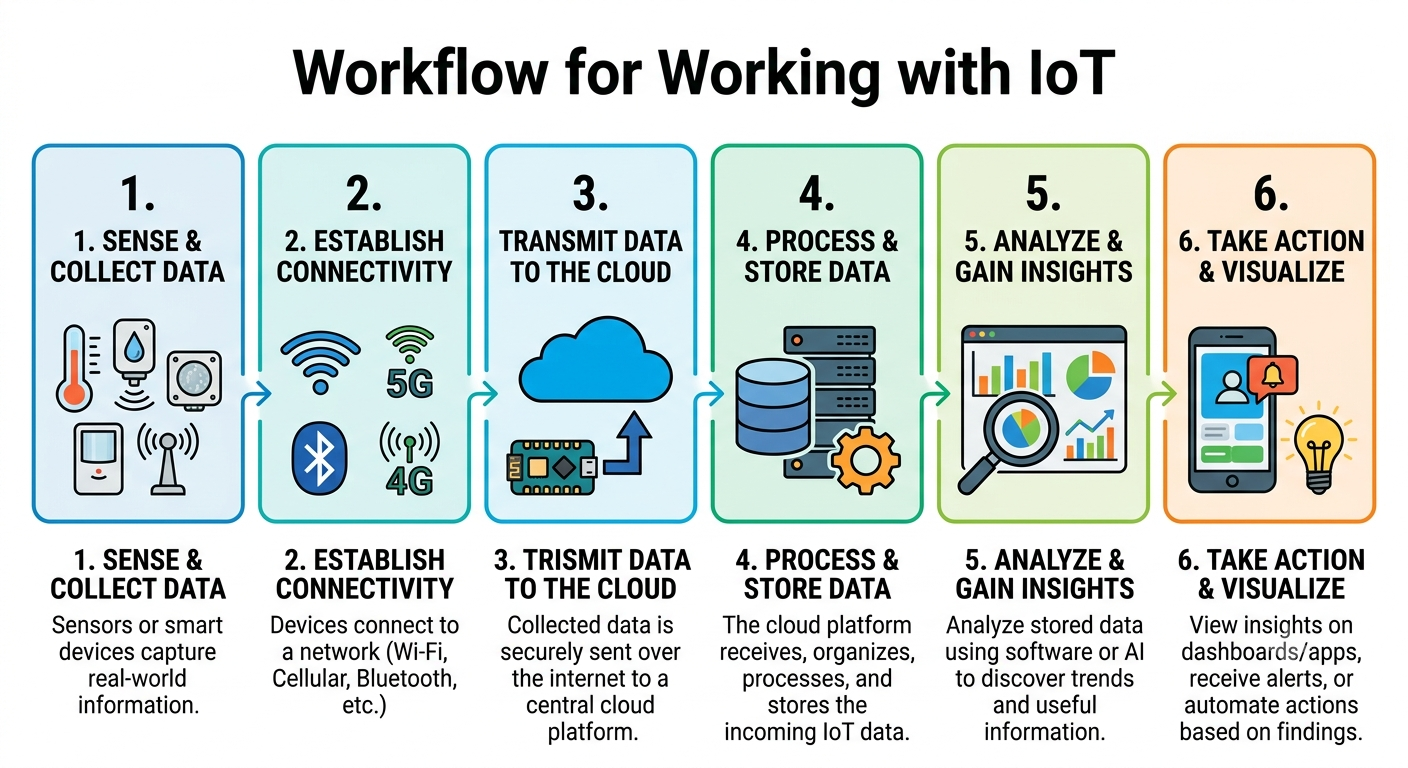
Sense → Connect → Transmit → Process → Analyze → Act
That pattern is the foundation of the Internet of Things (IoT).
IoT connects physical objects to digital systems so that devices can collect information from the real world, communicate that information, and support decisions or automated actions. The technology combines sensors, embedded computing, networking, cloud platforms, data processing, analytics, and security.
The accompanying KnowledgeBoost diagram presents this process as six connected stages: sense and collect data, establish connectivity, transmit data to the cloud, process and store data, analyze and gain insights, and take action and visualize.
The key idea: IoT is not simply about connecting a device to the internet. It is about turning physical-world events into usable data and then turning that data into information, decisions, or actions.
1. What Is the Internet of Things?
The Internet of Things, usually shortened to IoT, describes systems in which physical devices can sense information, communicate data, process information, and sometimes perform actions with limited direct human intervention.
An IoT device might contain:
- One or more sensors
- A microcontroller or processor
- Communication hardware
- Firmware or embedded software
- A power source
- Security mechanisms
- An interface to another device or platform
Consider a simple temperature-monitoring system.
A temperature sensor measures the environment. A small computing device reads the sensor. A network connection sends the measurement to another system. Software stores and analyzes the reading. If the temperature crosses a defined threshold, the system can generate an alert or trigger another device.
The complete chain becomes:
Physical environment → Sensor → Device → Network → Cloud/Edge → Data processing → Analytics → Action
That chain is what makes IoT an important area of modern computing.
2. How Does IoT Work?
An IoT system normally contains several layers rather than one single device.
A useful conceptual model is:
Layer 1: Physical sensing
Sensors observe the real world.
Layer 2: Device and edge computing
A microcontroller, gateway, or edge computer receives and may preprocess sensor data.
Layer 3: Connectivity
The device communicates using a suitable wired or wireless network.
Layer 4: Data ingestion and processing
A local or cloud platform receives, validates, transforms, and stores the incoming data.
Layer 5: Analytics
Software examines the data to identify trends, anomalies, patterns, or conditions.
Layer 6: Application and action
Users see dashboards and alerts, or automated systems respond to the information.
The boundaries between these layers can vary. Some IoT systems process most data locally at the edge, while others send substantial amounts of information to cloud infrastructure.
The important principle is that IoT is an end-to-end system.
3. Stage One: Sense and Collect Data
The first stage in the IoT workflow is sensing.
A sensor converts a physical condition into a measurable signal.
Examples include sensors for:
- Temperature
- Humidity
- Pressure
- Light
- Motion
- Vibration
- Distance
- Sound
- Gas concentration
- Location
- Heart rate
- Soil moisture
For example, a smart agriculture system might measure soil moisture every few minutes.
The sensor itself does not necessarily understand the meaning of the data. It simply produces measurements.
A controller can then read those measurements and attach useful context such as:
- Device identifier
- Timestamp
- Sensor type
- Location
- Measurement value
- Battery level
A resulting message might conceptually look like:
device: field-sensor-07
timestamp: 2026-09-12T10:30:00
soil_moisture: 31.4
battery: 82
The exact format depends on the system.
Why data quality matters
Poor sensor data can produce poor decisions.
Sensors may experience:
- Calibration errors
- Noise
- Missing readings
- Battery problems
- Communication failures
- Environmental interference
Therefore, an IoT system should not assume that every measurement is automatically correct.
Data validation and filtering can be important parts of the architecture.
4. Stage Two: Establish Connectivity
Once data has been collected, the device needs a way to communicate.
Connectivity is one of the most important decisions in IoT networking because different applications have very different requirements.
Possible communication technologies include:
- Wi-Fi
- Bluetooth and Bluetooth Low Energy
- Cellular networks
- Ethernet
- Zigbee
- LoRaWAN
- Thread
- Other specialized wireless technologies
The correct option depends on factors such as:
- Range
- Power consumption
- Bandwidth
- Cost
- Reliability
- Device density
- Mobility
- Environmental conditions
A battery-powered agricultural sensor may prioritize low power consumption and long range. A smart television may need high bandwidth. A factory machine may require reliable low-latency communication.
There is therefore no single "best IoT network."
The network should match the application's requirements.
5. IoT Protocols: How Devices Communicate
Connectivity provides the communication path, but devices also need communication protocols.
One important IoT protocol is MQTT (Message Queuing Telemetry Transport).
MQTT uses a publish/subscribe model.
A device can publish data to a topic, while other systems can subscribe to that topic.
Conceptually:
Temperature Sensor → MQTT Broker → Monitoring Application
The sensor does not necessarily need to communicate directly with every application.
Another protocol commonly associated with constrained IoT systems is CoAP (Constrained Application Protocol).
The choice of protocol depends on the requirements of the application, devices, network, and infrastructure.
When studying IoT protocols, it is useful to ask:
- How much data is being transmitted?
- How reliable must delivery be?
- How constrained is the device?
- What latency is acceptable?
- How should devices authenticate?
- How should messages be protected?
Protocols are therefore an architectural decision, not merely a programming detail.
6. Stage Three: Transmit Data to the Cloud
After a device establishes connectivity, its data can be transmitted to a central platform.
This is where IoT intersects strongly with cloud computing.
A cloud platform can provide infrastructure for:
- Receiving device messages
- Managing device identities
- Storing data
- Processing streams
- Running analytics
- Generating alerts
- Providing dashboards
- Integrating with other applications
For example:
Sensor → Network → IoT Gateway → Cloud Platform
The cloud does not necessarily have to process every raw measurement immediately. Depending on the application, the gateway or edge device may filter, aggregate, or analyze some data before transmission.
This becomes especially important when thousands or millions of devices are producing data continuously.
7. Edge Computing and IoT
A common misconception is that every IoT measurement must travel to a distant cloud server before anything useful can happen.
That is not always the case.
Edge computing moves some processing closer to where data is generated.
Imagine a factory machine that produces vibration measurements hundreds of times per second.
Sending every raw reading to the cloud might consume unnecessary bandwidth and introduce delay.
An edge computer could analyze the vibration locally and send only useful information:
Raw sensor readings → Edge processing → "Anomaly detected" → Cloud
Edge computing can provide benefits such as:
- Lower latency
- Reduced bandwidth consumption
- Faster local responses
- Greater resilience when connectivity is interrupted
- Local processing of sensitive information
Cloud and edge computing are therefore complementary rather than competing concepts.
A practical IoT system may use both.
8. Stage Four: Process and Store IoT Data
Raw IoT data is rarely useful by itself.
A platform may need to:
- Receive the message
- Validate it
- Identify the device
- Add metadata
- Transform the data
- Store it
- Forward it to analytics systems
Different types of IoT data may require different storage approaches.
For example:
- Recent sensor readings may be stored in a time-series system.
- Device configuration may belong in a database.
- Large historical datasets may be stored in object storage.
- Application information may use a relational database.
The architecture should therefore distinguish between data collection and data management.
An IoT project that successfully collects data but cannot organize or retrieve it efficiently has only solved part of the problem.
9. Stage Five: Analyze and Gain Insights
This is where collected data becomes valuable information.
Suppose a factory collects vibration data from hundreds of machines.
Simply storing millions of measurements does not automatically improve operations.
Analytics can help answer questions such as:
- Which machines are behaving unusually?
- Is vibration increasing over time?
- Which operating conditions correlate with failures?
- Can maintenance be predicted?
- Are some machines consuming more energy than expected?
Analytics may involve:
- Descriptive statistics
- Threshold detection
- Trend analysis
- Anomaly detection
- Machine learning
- Predictive analytics
For a simpler system, a rule may be sufficient:
If temperature > threshold → generate alert
For a more advanced system, historical data might be used to identify patterns associated with equipment failure.
This progression demonstrates why IoT increasingly overlaps with data science, artificial intelligence, and machine learning.
10. Stage Six: Take Action and Visualize
The final stage of the workflow turns information into something useful.
An IoT application may present data through:
- Dashboards
- Mobile applications
- Web applications
- Reports
- Alerts
- Notifications
It can also trigger automated actions.
For example:
Soil moisture too low → irrigation system activated
or:
Machine vibration anomaly → maintenance alert generated
or:
Room occupancy detected → building system adjusts lighting
The important distinction is between monitoring and automation.
Monitoring tells a person what is happening.
Automation allows the system to respond according to defined rules or models.
A mature IoT architecture can support both.
11. IoT Architecture: A Practical Example
Consider a smart greenhouse.
The greenhouse contains:
- Temperature sensors
- Humidity sensors
- Soil-moisture sensors
- Light sensors
- Irrigation controls
A possible architecture is:
Sensors → Edge Controller → Wireless Network → Cloud Platform → Database → Analytics Dashboard → Irrigation/Alerts
The workflow might operate like this:
- Sensors collect environmental measurements.
- An edge controller reads the sensors.
- The controller validates or aggregates readings.
- Data is transmitted through the network.
- A cloud platform receives the information.
- Data is stored for historical analysis.
- Analytics identify environmental conditions.
- A dashboard displays the results.
- An automated rule activates irrigation when appropriate.
This example shows that an IoT project is really a combination of hardware, embedded programming, networking, cloud infrastructure, data engineering, analytics, and application development.
12. IoT Security: Why Connected Devices Create New Risks
Connecting a physical device to a network creates an additional attack surface.
IoT security therefore needs to be considered throughout the architecture.
Important areas include:
Device identity
Each device should have a reliable identity so that the platform can distinguish legitimate devices from unauthorized ones.
Authentication
Systems should verify that devices and users are who they claim to be.
Authorization
A device should receive only the permissions it needs.
Encryption
Sensitive communication should be protected against interception and manipulation.
Secure updates
IoT devices may remain deployed for years, so the ability to update firmware securely is important.
Network segmentation
Devices should not automatically have unrestricted access to every other system on a network.
Monitoring
Unexpected device behavior can be an indicator of compromise or malfunction.
Security is particularly important because IoT devices can exist in homes, vehicles, factories, hospitals, farms, and other physical environments.
A compromised device may therefore create consequences beyond a normal software application.
13. IoT and the Cloud
The combination of IoT and cloud computing is powerful because cloud platforms can provide scalable infrastructure for device fleets and large datasets.
A cloud-based IoT architecture may include:
Devices → Connectivity → Ingestion → Processing → Storage → Analytics → Application
The cloud can help organizations avoid building all infrastructure themselves.
However, cloud architecture introduces its own considerations:
- Cost
- Network dependency
- Data residency
- Security
- Latency
- Availability
- Vendor-specific services
A good IoT design does not automatically send everything to the cloud. It determines what should happen at the device, at the edge, and in centralized infrastructure.
15. Industrial IoT and Predictive Maintenance
One of the most interesting IoT applications is predictive maintenance.
Traditional maintenance may follow a schedule:
Inspect machine every 30 days
IoT can enable a condition-based approach:
Monitor machine continuously → detect changing behavior → identify possible failure → schedule maintenance
Suppose a machine normally operates with a particular vibration profile.
Over time, the vibration pattern begins changing.
An analytics system can identify the deviation and produce an alert before a major failure occurs.
This can potentially reduce:
- Unexpected downtime
- Maintenance disruption
- Equipment damage
- Emergency repair costs
However, predictive maintenance depends on data quality, appropriate models, domain knowledge, and careful validation. Installing sensors alone does not create predictive intelligence.
16. IoT Assignment Help: How to Approach an IoT Project
Students often encounter IoT in computer science, electronics, networking, embedded systems, cloud computing, and engineering courses.
An IoT Assignment Help request often involves designing an architecture rather than simply writing code.
A strong academic IoT project should clearly explain:
- The problem being solved
- The physical environment
- Sensors and actuators
- Device hardware
- Communication technology
- IoT protocols
- Edge or gateway processing
- Cloud architecture
- Data storage
- Analytics
- Security
- User interface
- Testing
- Limitations
- Future improvements
For example, an IoT networking assignment should not merely state that Wi-Fi is used. It should explain why Wi-Fi is appropriate compared with alternatives and what its limitations are for the particular application.
Likewise, an IoT architecture assignment should explain how data moves through the system and where processing takes place.
17. IoT Project Design: Questions to Ask Before Building
Before purchasing hardware or writing firmware, define the requirements.
What needs to be measured?
Identify the physical variables.
How frequently should measurements be collected?
A temperature sensor may not need to report every millisecond, while an industrial vibration system might require very high sampling rates.
How much power is available?
Battery-powered devices need different design choices from mains-powered equipment.
How far must data travel?
Range affects connectivity decisions.
What happens if the network disappears?
An IoT system may need local buffering or edge processing.
Does the device need to respond immediately?
Latency-sensitive actions may need to occur locally.
How long must data be retained?
Retention requirements influence storage architecture and cost.
What happens if a device is compromised?
Security and isolation should be designed before deployment.
These questions help turn a vague IoT idea into an engineering specification.
19. IoT, AI, and Data Analytics
IoT generates data; analytics makes that data useful; AI can sometimes make the resulting system more adaptive.
The relationship can be summarized as:
IoT → Data → Analytics → Intelligence → Action
For example:
Sensor readings → Historical dataset → Anomaly detection → Predicted problem → Maintenance alert
This is why IoT projects increasingly combine technologies that were traditionally taught separately.
An IoT engineer may need knowledge of:
- Embedded systems
- Networking
- Cloud computing
- Databases
- Data engineering
- Cybersecurity
- Programming
- Machine learning
The field is inherently multidisciplinary.
22. Final Takeaways
The Internet of Things is best understood as a complete pipeline rather than a collection of smart gadgets.
The essential workflow is:
1. Sense & Collect Data → 2. Establish Connectivity → 3. Transmit Data → 4. Process & Store → 5. Analyze → 6. Take Action
Sensors capture information from the physical world.
Connectivity moves information between devices and systems.
Edge and cloud platforms process and store data.
Analytics converts measurements into useful insights.
Applications and automation turn those insights into decisions and actions.
Security protects the entire chain.
For students, an IoT assignment becomes much stronger when it explains the complete journey of the data instead of focusing only on the hardware. For developers, the same principle applies to real projects: a successful IoT solution must consider devices, networks, data, software, operations, security, and lifecycle management together.
The most useful way to think about IoT is therefore:
IoT connects the physical world to digital intelligence by turning real-world events into data, data into insights, and insights into action.
That is the real technology behind the phrase Internet of Things.
KnowledgeBoost Perspective
The most important lesson is that an IoT system is not defined by the presence of a sensor or an internet connection.
A useful IoT system creates a complete path from physical observation to meaningful action.
Sense → Connect → Process → Analyze → Act
Once that workflow is understood, smart homes, industrial monitoring, connected healthcare, agriculture, logistics, and smart-city systems become different applications of the same fundamental architecture.
For anyone studying IoT, the goal should not be to memorize a list of devices and protocols. The goal should be to understand why each component exists, how data moves through the system, where decisions are made, and how the entire system remains secure and reliable.