SQL Databases Explained: What Really Happens When You Run a Query?
Writing a SQL query can feel almost effortless.
SELECT name, email
FROM students
WHERE course = 'Computer Science';
A few lines of text go into a database tool, a result appears, and the process can seem almost magical.
But a relational database is doing considerably more work than simply "looking for rows."
Behind that apparently simple query is a sequence of processes involving query parsing, validation, optimization, execution, indexes, storage, memory, transactions, concurrency, and result generation.
Understanding what happens behind the scenes changes the way developers think about databases. SQL stops being just a collection of commands and starts becoming an interface to a sophisticated data-processing system.
This article explores that journey from beginning to end.
What Is a Database?
A database is an organized system for storing and retrieving information.
Although a database can appear to a user as a collection of tables, modern database management systems do much more than store data. They provide mechanisms for:
- storing structured information
- retrieving information efficiently
- modifying existing records
- enforcing data integrity
- managing concurrent users
- handling transactions
- recovering from failures
- controlling access
- optimizing queries
- maintaining consistency
A Database Management System (DBMS) is the software responsible for providing these capabilities.
Examples of relational database management systems include:
- PostgreSQL
- MySQL
- MariaDB
- Microsoft SQL Server
- Oracle Database
- SQLite
The SQL language provides a standardized way of communicating with many relational database systems, although individual database products also implement their own extensions and features.
Programming vs Working With a Database
There is an important distinction between application code and database operations.
Consider a web application that displays student information.
The application might contain code such as:
User opens student dashboard
        ↓
Application receives request
        ↓
Application creates SQL query
        ↓
Database receives query
        ↓
Database processes query
        ↓
Database returns rows
        ↓
Application processes result
        ↓
Browser displays information
The application does not normally need to know where individual records are physically stored.
Instead, it asks the database for the information it needs.
That separation is one of the major strengths of database systems.
What Happens When You Run a SQL Query?
Consider this query:
SELECT name
FROM students
WHERE student_id = 1042;
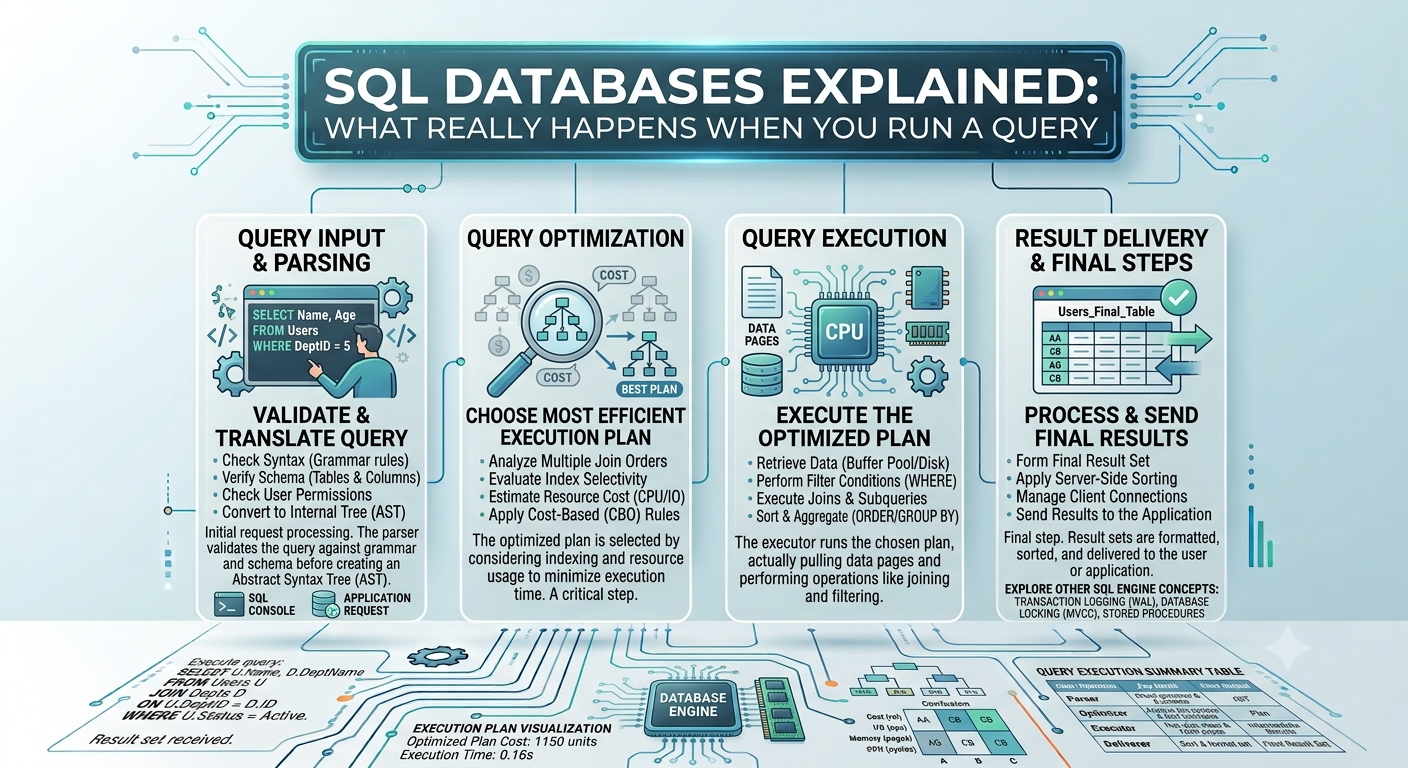
At a high level, the process looks like this:
SQL Query
   ↓
Connection
   ↓
Parsing
   ↓
Validation
   ↓
Query Planning
   ↓
Query Optimization
   ↓
Execution
   ↓
Data Access
   ↓
Result Construction
   ↓
Result Returned
The exact internal architecture varies between database systems, but this general model is useful for understanding what happens.
1. The Application Sends the Query
A query usually originates from an application, database client, command-line tool, notebook, or administrative interface.
The application sends the SQL statement through a database connection.
That connection may use a database-specific protocol or a driver such as a PostgreSQL, MySQL, or JDBC/ODBC-compatible driver.
At this point, the database has received a request expressed in SQL.
The database now has to figure out what that request means and how it can execute it efficiently.
2. Parsing the SQL
The first major stage is parsing.
The database examines the SQL statement and determines whether its structure follows the rules of the SQL language.
For example:
SELECT name
FROM students
WHERE course = 'Computer Science';
The database identifies components such as:
SELECT
    ↓
Columns requested: name

FROM
    ↓
Table: students

WHERE
    ↓
Condition: course = 'Computer Science'
A malformed query may fail at this stage.
For example:
SELEC name
FROM students;
The database can recognize that SELEC is not valid SQL syntax.
Parsing is therefore partly about understanding the structure of the statement.
3. Validation and Semantic Analysis
A syntactically valid query can still contain problems.
Consider:
SELECT employee_name
FROM students;
If the students table does not contain employee_name, the database cannot execute the query as written.
The database therefore needs to validate things such as:
- Does the table exist?
- Do the requested columns exist?
- Are the referenced objects accessible?
- Are the data types compatible?
- Does the user have permission to access the objects?
This stage is sometimes discussed alongside parsing or as part of a broader compilation process.
The important idea is that valid SQL syntax does not automatically mean a valid database operation.
4. The Database Builds a Query Plan
A SQL query describes what data is wanted, but it does not normally specify every physical step the database must take to retrieve the data.
The database determines an execution strategy.
That strategy is called a query plan or execution plan.
Query Optimization
A database may have several possible ways to answer the same query.
Suppose a table contains ten million student records.
The database could potentially:
Option A:
Read every row
↓
Check student_id
↓
Return matching row
Or, if a suitable index exists:
Option B:
Search index
↓
Locate matching student_id
↓
Find corresponding row
↓
Return result
Option B may be dramatically faster.
The database's optimizer evaluates possible execution strategies and selects a plan based on available information.
This is why SQL describes the desired result rather than manually controlling every low-level operation.
What Is an Execution Plan?
An execution plan represents the operations the database intends to perform.
A simplified plan might look like:
Index Scan
     ↓
Find student_id = 1042
     ↓
Fetch matching row
     ↓
Return name
For another query, the plan could involve:
Sequential Scan
     ↓
Filter rows
     ↓
Sort results
     ↓
Return rows
Database administrators and developers can inspect these plans using tools such as:
EXPLAIN
or database-specific variants such as:
EXPLAIN ANALYZE
These tools are extremely useful when investigating slow queries.
Tables, Rows and Columns
A relational database organizes information into tables.
Imagine a students table:
| student_id | name | course | year | |---|---|---|---:| | 1001 | Aisha | Computer Science | 2 | | 1002 | Rahul | Information Technology | 3 | | 1003 | Elena | Computer Science | 1 |
A table contains:
- columns, which describe attributes
- rows, which represent individual records
Relational databases become particularly powerful when multiple tables are connected through relationships.
Primary Keys
A primary key uniquely identifies a row.
CREATE TABLE students (
    student_id INTEGER PRIMARY KEY,
    name VARCHAR(100),
    course VARCHAR(100)
);
Here, student_id is the primary key.
The database can use this constraint to ensure that two rows do not have the same primary-key value.
A primary key can also play an important role in indexing and query performance, depending on the database system and schema design.
Foreign Keys and Relationships
Suppose there is another table:
CREATE TABLE projects (
    project_id INTEGER PRIMARY KEY,
    student_id INTEGER,
    project_title VARCHAR(200)
);
A foreign key can establish the relationship:
FOREIGN KEY (student_id)
REFERENCES students(student_id)
A simplified model is:
Students
   |
   | student_id
   ↓
Projects
This relationship becomes particularly important when using SQL joins.
SQL Joins Explained
One of the most important capabilities of relational databases is combining information from multiple tables.
Suppose the students table contains students and projects contains project submissions.
A query can combine them:
SELECT
    students.name,
    projects.title
FROM students
INNER JOIN projects
    ON students.student_id = projects.student_id;
The database has to determine how to efficiently match rows from the two tables.
Depending on the data, indexes, statistics, and optimizer decisions, the database may choose different join strategies.
INNER JOIN
An INNER JOIN returns rows that have matching records in both tables.
LEFT JOIN
A LEFT JOIN keeps all rows from the left table even when no corresponding row exists in the right table.
SELECT
    students.name,
    projects.title
FROM students
LEFT JOIN projects
    ON students.student_id = projects.student_id;
This can be useful when the requirement is:
Show every student, including students who have not yet submitted a project.
The Mystery of Database Indexes
Indexes are among the most important concepts for understanding database performance.
Imagine a table containing millions of records.
Without an appropriate index, the database may have to inspect many rows to determine which records match a condition.
An index provides an additional data structure that can help the database locate relevant records more efficiently.
A Simple Analogy
Consider a textbook with 1,500 pages.
Finding a term by reading every page would be inefficient.
The index at the back of the book provides a shortcut:
Term
  ↓
Page number
  ↓
Relevant information
A database index serves a somewhat similar purpose.
The internal implementation is much more sophisticated than a textbook index, but the analogy is useful.
B-Tree Indexes
Many relational database systems commonly use B-tree or related balanced-tree structures for general-purpose indexes.
Suppose:
CREATE INDEX idx_students_course
ON students(course);
A query such as:
SELECT *
FROM students
WHERE course = 'Computer Science';
may be able to use that index.
However, an index is not automatically beneficial for every query.
The optimizer decides whether using it makes sense.
Why More Indexes Are Not Always Better
Indexes can make reads faster, but they also introduce costs.
When a row is inserted, the database may need to update relevant indexes.
Similarly, updates and deletes may require index maintenance.
Indexes also consume storage.
Therefore:
More indexes
      ↓
Potentially faster reads
      +
More storage
      +
More maintenance during writes
Good database design balances these trade-offs.
Transactions: Keeping Operations Consistent
Consider an online banking transaction.
Suppose ₹1,000 is transferred from Account A to Account B.
Conceptually:
Subtract ₹1,000 from A
          ↓
Add ₹1,000 to B
What happens if the system succeeds at the first operation but crashes before the second?
The database needs a mechanism to ensure that the overall operation is handled consistently.
That mechanism is a transaction.
A transaction groups related operations into a logical unit of work.
ACID Properties
Database transactions are commonly discussed using the ACID model.
Atomicity
A transaction is treated as a unit.
Everything succeeds
       OR
The transaction is rolled back
Consistency
A successful transaction should preserve the database's defined integrity rules and constraints.
Isolation
Concurrent transactions should not interfere with one another in arbitrary or unsafe ways.
Durability
Once a transaction has been successfully committed, the database should preserve its effects despite appropriate system failures.
These properties are central to reliable transactional database systems.
COMMIT and ROLLBACK
Transactions commonly involve operations such as:
BEGIN;

UPDATE accounts
SET balance = balance - 1000
WHERE account_id = 101;

UPDATE accounts
SET balance = balance + 1000
WHERE account_id = 202;

COMMIT;
If something goes wrong before completion, the application may instead roll the transaction back.
ROLLBACK;
The exact transaction syntax and behavior can vary between database systems, but the fundamental concept remains important:
Related changes should be managed as a coherent unit when the application's correctness requires it.
Concurrency: What Happens When Many Users Access the Database?
Real databases rarely serve one user at a time.
A production database may simultaneously receive requests from:
- web applications
- mobile applications
- background workers
- administrators
- analytics systems
- scheduled jobs
- APIs
Imagine two users trying to modify the same record at almost exactly the same time.
The database must coordinate these operations.
This is the problem of concurrency control.
Locks and Isolation
Database systems can use mechanisms such as locks, multiversion concurrency control, and transaction isolation rules to manage concurrent operations.
Different isolation levels provide different balances between:
- consistency
- concurrency
- performance
Common isolation-level concepts include:
Read Uncommitted
Read Committed
Repeatable Read
Serializable
The precise behavior depends on the database system.
The important lesson is that a database is coordinating potentially many simultaneous operations.
Database Normalization
As databases grow, poor structure can create duplicated and inconsistent information.
Consider storing:
student_name
student_email
student_course
project_title
project_supervisor
for every project record.
If a student has ten projects, the student's information may be repeated ten times.
Normalization provides principles for structuring relational data to reduce unnecessary duplication and improve consistency.
First Normal Form
First Normal Form, or 1NF, generally requires that data be represented in atomic values rather than inappropriate repeating groups.
Second Normal Form
2NF builds on 1NF and addresses partial dependencies in tables with composite keys.
Third Normal Form
3NF further reduces inappropriate dependencies between non-key attributes.
The broader goal is to design tables where:
- data is represented clearly
- unnecessary duplication is reduced
- relationships are explicit
- updates do not create avoidable inconsistencies
When Denormalization Makes Sense
Normalization is valuable, but highly normalized designs are not automatically optimal for every workload.
Some systems intentionally duplicate or precompute information to improve read performance.
This is known as denormalization.
The correct design depends on the application's workload.
Query Performance
A query that works correctly can still be inefficient.
Consider:
SELECT *
FROM orders
WHERE customer_id = 10025;
If the orders table contains tens of millions of rows, performance depends on factors such as:
- available indexes
- table statistics
- data distribution
- query structure
- storage
- memory
- concurrent workloads
- database configuration
- selected execution plan
This is why database performance cannot always be solved by simply "writing shorter SQL."
Sequential Scans
A sequential scan means the database reads through a large portion of a table to evaluate the query.
Conceptually:
Row 1 → check
Row 2 → check
Row 3 → check
Row 4 → check
...
Row N → check
A sequential scan is not inherently bad.
If a query needs a large percentage of the table, scanning the table may actually be more efficient than using an index to locate a huge number of individual rows.
This is another reason the optimizer matters.
EXPLAIN: Looking Inside the Query
One of the most useful tools for understanding query performance is:
EXPLAIN
For example:
EXPLAIN
SELECT *
FROM students
WHERE course = 'Computer Science';
Depending on the database system, the plan may reveal operations such as:
Seq Scan
Index Scan
Index Only Scan
Sort
Hash Join
Nested Loop
Aggregate
With an execution-analysis command, developers can also investigate what actually happened during execution.
EXPLAIN ANALYZE
SELECT *
FROM students
WHERE course = 'Computer Science';
This can help identify expensive operations and unexpected plans.
The N+1 Query Problem
A particularly common performance problem occurs when application code repeatedly queries the database.
Imagine an application first retrieves 100 students:
SELECT *
FROM students;
Then performs another query for every student:
Get student 1 → query projects
Get student 2 → query projects
Get student 3 → query projects
...
Get student 100 → query projects
Instead of one query, the application may perform approximately 101 database queries.
This is commonly called the N+1 query problem.
Depending on the application and database, a carefully designed join or batch query may dramatically reduce unnecessary database communication.
SQL Database vs NoSQL
Relational databases are not the only database model.
Other systems include:
- document databases
- key-value stores
- graph databases
- wide-column databases
- search-oriented data stores
A relational database may be an excellent choice when an application needs:
- structured relationships
- transactions
- constraints
- complex queries
- strong consistency requirements
A document-oriented system may be attractive when data naturally maps to flexible documents and the application's access patterns fit that model.
The question is therefore not:
Which database is universally better?
It is:
Which data model and database system fit the application's requirements?
A Complete Example: From Application to Database Result
Consider a university project-management application.
A student opens a dashboard showing all submitted projects.
The application might send:
SELECT
    s.name,
    p.project_title,
    p.submitted_at
FROM students s
INNER JOIN projects p
    ON s.student_id = p.student_id
WHERE s.student_id = 1042
ORDER BY p.submitted_at DESC;
What happens?
Step 1: The Application Sends the Query
The application sends the SQL statement through its database connection.
Step 2: The Database Parses It
The database identifies:
SELECT
FROM
INNER JOIN
ON
WHERE
ORDER BY
and builds an internal representation of the query.
Step 3: The Database Validates It
The database checks:
- whether
studentsexists - whether
projectsexists - whether the referenced columns exist
- whether the application has permission
- whether the expressions are valid
Step 4: The Optimizer Considers Execution Strategies
The optimizer may consider:
How should students be accessed?
How should projects be accessed?
Should an index be used?
Which table should be accessed first?
How should the join be performed?
How should the result be sorted?
Step 5: The Execution Engine Runs the Plan
A simplified conceptual plan could be:
Find student 1042
       ↓
Find related projects
       ↓
Join records
       ↓
Sort by submitted_at
       ↓
Return rows
The actual plan could be considerably more complex.
Step 6: The Database Returns the Result
The database sends the resulting rows back to the application.
The application then converts the data into whatever format the user interface requires.
What looked like a simple SQL query involved an entire pipeline of database operations.
Development, Staging and Production Databases
A database environment can differ depending on where software is running.
Development
Used by developers while building and testing software.
Staging
A controlled environment designed to resemble production and validate changes before release.
Production
The live environment serving real users and real business operations.
A common deployment flow is:
Developer
   ↓
Development Database
   ↓
Testing
   ↓
Staging
   ↓
Production Database
Production databases generally require stronger controls around:
- backups
- access
- migrations
- security
- recovery
- performance
Database Migrations
Applications evolve.
A simple students table may initially contain:
student_id
name
email
Later, the application may need:
date_of_birth
department
phone_number
Changing the database structure is known as a schema migration.
Migration systems allow development teams to track database changes alongside application code.
A migration might conceptually say:
Version 1
    ↓
Create students table

Version 2
    ↓
Add department

Version 3
    ↓
Add index on email
This is an important part of professional software engineering because application code and database structure often evolve together.
Database Backups and Recovery
Databases contain valuable information, so storing data is only part of the responsibility.
Systems also need strategies for recovering from:
- hardware failures
- accidental deletion
- software problems
- corruption
- security incidents
- operational mistakes
Backup strategies can include:
- full backups
- incremental backups
- transaction logs
- replication
- point-in-time recovery
A backup is only useful if it can actually be restored.
Therefore, backup testing is an important part of database administration.
Security and Databases
Database security involves much more than putting a password on a database server.
Important practices include:
- authentication
- authorization
- least-privilege access
- encrypted connections
- secure credential management
- auditing
- backups
- input validation
- protection against SQL injection
One particularly important application-security principle is to avoid constructing SQL queries by directly concatenating untrusted user input.
Instead of unsafe query construction such as:
"SELECT * FROM users WHERE name = '" + userInput + "'"
applications should use parameterized queries or prepared statements supported by their database driver or framework.
The database should never be treated as a trusted place where security considerations can be ignored.
SQL Injection
SQL injection occurs when untrusted input is improperly incorporated into SQL statements in a way that changes the intended query.
The problem is not SQL itself.
The problem is unsafe construction of SQL commands.
Parameterized queries help separate:
SQL structure
from:
User-provided values
This distinction is one of the fundamental principles of secure database programming.
Why Database Knowledge Matters for Developers
A developer does not necessarily need to become a database administrator.
However, understanding database fundamentals can significantly improve application development.
Database knowledge helps developers understand:
- why some queries are slow
- why indexes matter
- why schema design matters
- why joins can become expensive
- why transactions are necessary
- why concurrency creates difficult bugs
- why migrations need care
- why database security matters
- why an ORM does not eliminate database concepts
Modern frameworks can hide much of the SQL behind an ORM or data-access layer.
But abstraction does not eliminate the underlying database.
For example, application code might contain:
Student.findMany({
    where: {
        course: "Computer Science"
    }
})
The ORM may ultimately translate that request into SQL and send it to a relational database.
Understanding the SQL layer therefore remains valuable even when developers rarely write raw SQL.
ORMs: Useful Abstraction, Not Magic
Object-Relational Mapping tools allow developers to interact with relational databases through programming-language objects and APIs.
Examples include ORM approaches available for languages such as:
- JavaScript/TypeScript
- Python
- Java
- C#
- Ruby
An ORM can make application development more convenient.
However, developers still need to understand:
Application code
      ↓
ORM
      ↓
Generated SQL
      ↓
Database optimizer
      ↓
Execution
      ↓
Storage
An ORM can generate inefficient queries just as a developer can.
The abstraction therefore reduces some repetitive work but does not remove the need for database literacy.
Common Database Mistakes
Several database problems appear repeatedly in software projects.
Treating the database like a file
Databases provide transactions, constraints, indexing, concurrency control, and query processing. Treating them as simple storage containers ignores much of their value.
Adding indexes everywhere
Indexes have benefits, but they also consume storage and increase write overhead.
Ignoring query plans
A query that appears simple can have an expensive execution plan.
Storing everything in one table
Poor schema design can create duplication, anomalies, and maintenance problems.
Ignoring transactions
Related operations may require transactional guarantees.
Assuming the ORM will solve everything
ORMs are abstractions, not replacements for database knowledge.
Forgetting backups
A database without a tested recovery strategy can become a serious operational risk.
A Practical Mental Model
A useful way to think about a relational database is:
             APPLICATION
                  │
                  ▼
             SQL / ORM
                  │
                  ▼
             DATABASE
                  │
          ┌───────┴────────┐
          ▼                ▼
       Parser          Permissions
          │
          ▼
      Query Planner
          │
          ▼
      Query Optimizer
          │
          ▼
     Execution Engine
          │
      ┌───┴────┐
      ▼        ▼
    Indexes   Tables
      │        │
      └───┬────┘
          ▼
       Result
          │
          ▼
       APPLICATION
          │
          ▼
          USER
This model explains why databases are much more than collections of tables.
The Most Important Idea: SQL Describes What, Not Every How
One of the most useful concepts to take away is that SQL generally describes what result is wanted.
For example:
SELECT name
FROM students
WHERE course = 'Computer Science';
The query does not normally dictate the exact physical execution process.
The database is responsible for determining an efficient way to produce the requested result.
That gives the database system freedom to consider:
- indexes
- scans
- joins
- sorting
- caching
- statistics
- available resources
- data distribution
- execution strategies
This separation between declarative queries and physical execution is one of the reasons relational databases can remain powerful and flexible.
What Happens When a Query Is Slow?
When a SQL query becomes slow, the answer should not automatically be:
Add an index.
A better investigation might look like:
1. Reproduce the problem
        ↓
2. Inspect the SQL
        ↓
3. Examine EXPLAIN / execution plan
        ↓
4. Check indexes
        ↓
5. Check joins and filters
        ↓
6. Check data volume
        ↓
7. Check statistics
        ↓
8. Check application behavior
        ↓
9. Measure again
Database optimization should be evidence-driven.
A change that appears theoretically faster may not actually improve the workload.
Key Takeaways
A SQL query may look simple:
SELECT *
FROM students
WHERE course = 'Computer Science';
But a database system may perform many operations before returning the result.
The overall process can be summarized as:
SQL Query
   ↓
Parse
   ↓
Validate
   ↓
Plan
   ↓
Optimize
   ↓
Execute
   ↓
Access data
   ↓
Build result
   ↓
Return result
The most important concepts to remember are:
- Tables organize relational data.
- Primary keys identify records.
- Foreign keys represent relationships.
- Joins combine related data.
- Indexes can make data retrieval significantly faster.
- Transactions group related operations into logical units.
- ACID describes important transactional properties.
- Concurrency control allows many users to work with the database safely.
- Normalization helps structure relational data effectively.
- Query plans reveal how databases intend to execute queries.
- EXPLAIN can help investigate query performance.
- ORMs provide abstraction but do not eliminate database concepts.
- Security must be considered at both the application and database layers.
- Backups and recovery are essential for production systems.
Most importantly, a relational database is not simply a place where rows are stored.
It is a data-processing system that interprets requests, chooses execution strategies, manages storage, coordinates concurrent operations, enforces rules, and returns results.
Once that mental model becomes clear, SQL becomes much easier to understand.
The next time a query returns results in milliseconds, there is a little more appreciation for what happened between pressing Run and seeing the first row appear.
Final Thought
Learning SQL syntax is useful.
Understanding why the database behaves the way it does is far more powerful.
The difference becomes especially important as datasets grow, applications acquire more users, queries become more complicated, and software moves from a development laptop into production.
At that point, knowing how to write:
SELECT ...
is only the beginning.
Knowing what happens after SELECT is sent to the database is where database engineering really starts.