
Software Engineering: From Idea to Production
Writing code is only one part of building software.
A small program can sometimes be written, tested, and finished in a few hours. Real software systems are different. They have requirements, users, databases, interfaces, dependencies, security considerations, tests, deployment environments, and people who need to maintain the system long after the first version is released.
That broader discipline is software engineering.
Software engineering is the process of applying structured engineering principles to the design, development, testing, deployment, and maintenance of software systems.
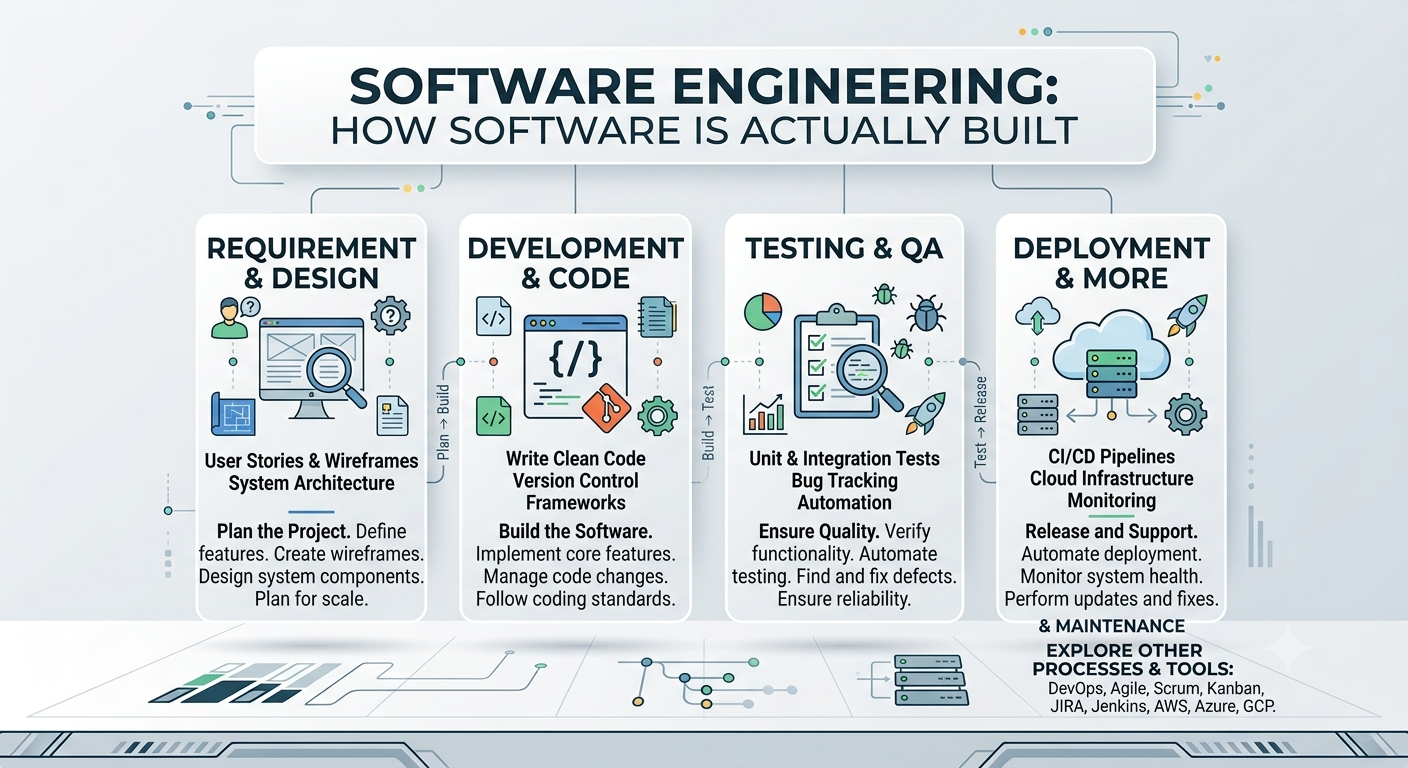
The goal is not simply to make software that works once. The goal is to build software that can be understood, tested, changed, deployed, operated, and maintained reliably.
This article follows that journey from an initial idea all the way to production.
1. What Is Software Engineering?
Programming and software engineering are closely related, but they are not exactly the same thing.
Programming focuses primarily on writing instructions that a computer can execute.
Software engineering considers the larger system around that code.
A software engineer may need to answer questions such as:
- What problem is the software solving?
- Who will use it?
- What should the system do?
- What should happen when something goes wrong?
- How should the application be structured?
- Where should data be stored?
- How should different components communicate?
- How will the software be tested?
- How will changes be reviewed?
- How will the application be deployed?
- How will failures be detected?
- How will the system be maintained six months from now?
This is why software engineering becomes increasingly important as software grows.
A single-file script may not need an elaborate architecture. A large application with many developers, thousands of users, and hundreds of thousands of lines of code certainly does.
Programming vs software engineering
A useful simplified comparison is:
| Programming | Software Engineering | |---|---| | Writing code | Designing and maintaining software systems | | Solving an immediate coding problem | Solving a broader product or system problem | | Focuses heavily on implementation | Includes requirements, design, implementation, testing, deployment, and maintenance | | Can be an individual activity | Often involves collaboration | | May produce a small script | Can produce large, long-lived systems |
Programming is therefore an important part of software engineering, but software engineering extends far beyond the code editor.
2. The Software Development Lifecycle (SDLC)
The Software Development Lifecycle, commonly abbreviated as SDLC, describes the major activities involved in developing and maintaining software.
Different organizations use different terminology and development methodologies, but a simplified lifecycle can be represented as:
Requirements
     ↓
Planning
     ↓
Design
     ↓
Development
     ↓
Testing
     ↓
Deployment
     ↓
Maintenance
     ↓
Feedback / New Requirements
     └──────────────→
The lifecycle is not necessarily a straight line.
Real projects are iterative.
A testing problem may reveal a design problem. A production failure may expose a missing requirement. User feedback may lead to a new feature. A change in business requirements may require architectural changes.
The important idea is that software continues to evolve.
The major SDLC stages
| Stage | Main question | |---|---| | Requirements | What problem are we solving? | | Planning | What needs to be done and how will the work be organized? | | Design | How should the system work? | | Development | How will the design be implemented? | | Testing | Does the software behave correctly? | | Deployment | How will the software reach users? | | Maintenance | How will the software remain useful and reliable? |
3. From an Idea to Working Software
Software usually begins with a problem or opportunity rather than a programming language.
Imagine the initial idea is:
"People need an easier way to track their daily tasks."
That statement is useful, but it is not yet a software specification.
The engineering process starts by asking what the application actually needs to accomplish.
Understanding the problem
Before deciding how to build the system, the problem needs to be understood.
Questions might include:
- Who are the users?
- What are they currently doing?
- What is difficult about the existing process?
- What information needs to be stored?
- What would make the new system useful?
This prevents a common mistake: building a technically impressive solution to the wrong problem.
Requirements
Requirements describe what the software should do and what constraints it should satisfy.
For a task-management application, functional requirements might include:
- Users can create tasks.
- Users can edit tasks.
- Users can delete tasks.
- Users can mark tasks as completed.
- Users can view their tasks.
- Tasks remain available after the user closes the application.
These are functional requirements because they describe system behaviour.
There are also non-functional requirements.
Examples include:
- The application should respond quickly.
- User information should be protected.
- The system should support increasing traffic.
- The application should remain available during expected failures.
- The codebase should be maintainable.
A system can satisfy its functional requirements and still be a poor product if it is extremely slow, unreliable, insecure, or impossible to maintain.
User stories
Requirements are often expressed using user stories.
A common structure is:
As a [type of user],
I want [some capability],
so that [some reason].
For the task application:
As a user,
I want to create a task,
so that I can remember work that needs to be completed.
Another might be:
As a user,
I want to mark a task as complete,
so that I can distinguish completed work from unfinished work.
User stories help connect technical implementation to the actual purpose of the software.
4. Planning the Software Project
Once the requirements are understood, the project needs to be planned.
Planning can include:
- Breaking the work into smaller tasks
- Identifying dependencies
- Estimating effort
- Assigning responsibilities
- Establishing milestones
- Identifying technical risks
- Deciding what belongs in the first release
A useful principle is to avoid trying to build everything at once.
A first version might contain:
User registration
       +
Create task
       +
Edit task
       +
Complete task
       +
Delete task
Additional features can come later.
This approach makes it easier to build, test, and learn from the first version before expanding the system.
5. Software Architecture
Once the requirements are understood, the next question is:
How should the software be structured?
That is where software architecture becomes important.
Architecture describes the major components of a system and how those components interact.
A simple web application might look like:
User
  │
  ↓
Web Browser
  │
  ↓
Frontend
  │
  ↓
API / Backend
  │
  ├────────→ Database
  │
  └────────→ External Services
Each part has a responsibility.
The frontend handles the user interface.
The backend handles application logic and communication.
The database stores persistent information.
External services may provide functionality such as email delivery, payments, authentication, maps, or other APIs.
Monolithic applications
A monolith is an application in which many parts of the system are deployed as a single application.
For a small application, that can be a very sensible architecture.
          Application
     ┌──────────────────┐
     │ User Interface   │
     │ Business Logic   │
     │ API              │
     │ Database Access  │
     └──────────────────┘
A monolith is not automatically bad architecture.
For many projects, starting with a well-structured monolith is simpler than immediately introducing multiple services.
Services and components
Larger systems may divide responsibilities into separate services or components.
For example:
Web Application
      │
      ├── User Service
      ├── Task Service
      ├── Notification Service
      └── Reporting Service
This can provide flexibility, but it also introduces additional complexity.
More services mean more communication, deployment, monitoring, configuration, and failure points.
Good architecture is therefore not about making a system as complicated as possible.
It is about choosing a structure that fits the problem.
6. APIs and Communication
Applications often need different components to communicate.
An API, or Application Programming Interface, defines how one piece of software can interact with another.
For example, a frontend might request:
GET /api/tasks
The backend could respond with JSON:
[
  {
    "id": 1,
    "title": "Study software engineering",
    "completed": false
  }
]
The frontend does not need to know how the database works internally.
It only needs to understand the API contract.
This separation allows different parts of a system to evolve independently.
APIs are also important when applications communicate with external systems.
Examples include:
- Payment APIs
- Mapping APIs
- Authentication services
- Cloud services
- Email providers
- Data platforms
Understanding APIs is therefore an important part of modern software engineering.
7. Version Control and Git
Software development becomes much safer when changes are tracked.
That is the purpose of version control.
Git is a distributed version-control system widely used for tracking changes to source code.
A Git repository records the history of a project.
A simplified workflow looks like:
Create / modify code
        ↓
Review changes
        ↓
Commit
        ↓
Push
        ↓
Remote repository
Commits
A commit represents a recorded set of changes.
For example:
git add .
git commit -m "Add task creation"
A useful commit message should communicate what changed.
Branches
Branches allow developers to work on changes without immediately modifying the main development line.
For example:
main
 │
 ├── feature/task-creation
 │
 ├── feature/user-profile
 │
 └── bugfix/login-error
After a feature is completed and reviewed, its changes can be merged.
Git vs GitHub
Git and GitHub are related but different.
Git is the version-control system.
GitHub is a platform for hosting Git repositories and collaborating around them.
Other platforms can provide similar functionality, including GitLab and Bitbucket.
Understanding this distinction helps avoid a common misconception: Git itself does not require GitHub.
8. Writing Maintainable Code
Code is usually written once but read many times.
A developer may spend considerable time reading existing code before making a change.
That makes readability and maintainability important engineering concerns.
Consider:
x = 10
y = 20
z = x + y
The code works, but the meaning of the variables is unclear.
Compare that with:
price = 10
shipping_cost = 20
total_cost = price + shipping_cost
The second version communicates intent more clearly.
Modularity
Large programs should not become one enormous block of logic.
Instead, functionality can be divided into modules and functions with clear responsibilities.
application/
├── users/
├── tasks/
├── authentication/
├── notifications/
└── reports/
This makes the system easier to understand and change.
Separation of concerns
A useful principle is separation of concerns.
Different parts of the system should have clearly defined responsibilities.
For example:
UI
 ↓
Application Logic
 ↓
Data Access
 ↓
Database
Mixing all of these responsibilities together can make future changes much harder.
DRY
DRY stands for Don't Repeat Yourself.
The principle encourages avoiding unnecessary duplication of logic.
If the same complicated calculation appears in five places, changing the calculation later becomes risky.
The solution may be to centralize the shared behaviour.
Single Responsibility Principle
The Single Responsibility Principle suggests that a component should have a focused responsibility rather than trying to do everything.
A function that validates input, writes to a database, sends an email, formats HTML, and logs an audit event is difficult to understand and test.
Separating those responsibilities usually produces a cleaner design.
9. Technical Debt
Software decisions often involve trade-offs.
A team might deliberately choose a quick implementation because a feature needs to be released quickly.
That decision may be reasonable.
However, shortcuts can accumulate.
This accumulated cost is often called technical debt.
Technical debt can take forms such as:
- Duplicated code
- Outdated dependencies
- Poorly structured modules
- Missing tests
- Temporary workarounds
- Difficult-to-understand code
- Architectural limitations
Technical debt is not necessarily the result of bad developers.
Sometimes it is a deliberate trade-off.
The important engineering practice is to recognize it and manage it rather than allowing it to grow indefinitely.
10. Testing Software
Software testing is not simply about finding bugs.
Testing provides evidence that software behaves as expected.
Different types of testing operate at different levels.
Unit testing
A unit test tests a small piece of functionality, often a function or class.
For example:
def add(a, b):
    return a + b
A test could verify:
assert add(2, 3) == 5
Unit tests are generally fast and can help detect regressions early.
Integration testing
Integration tests examine how multiple components work together.
For example:
API
 ↓
Business Logic
 ↓
Database
An integration test may verify that creating a task through the API actually results in the expected database record.
End-to-end testing
End-to-end testing examines a complete user workflow.
For example:
Open application
      ↓
Log in
      ↓
Create task
      ↓
Mark task complete
      ↓
Verify task status
This is closer to how a real user interacts with the application.
Manual vs automated testing
Manual testing can be valuable for exploratory testing and user-interface evaluation.
Automated tests are valuable because they can be executed repeatedly and consistently.
A mature project often uses both.
11. Code Reviews
When multiple developers work on the same codebase, changes should not always go directly into the main branch.
A code review provides another opportunity to inspect a change before it becomes part of the shared codebase.
A review might consider:
- Does the implementation solve the intended problem?
- Is the code understandable?
- Are there unnecessary changes?
- Are edge cases handled?
- Are tests included?
- Could the change introduce a security or performance problem?
- Does the implementation fit the existing architecture?
A good code review is not simply a search for mistakes.
It can also be a way of sharing knowledge across a development team.
A developer reviewing unfamiliar code learns how another part of the system works.
The original developer receives another perspective on the implementation.
12. CI/CD
Modern software teams often automate parts of the development and release process.
This is where CI/CD becomes important.
Continuous Integration
Continuous Integration, or CI, involves regularly integrating code changes and automatically checking those changes.
A simplified CI process might be:
Developer pushes code
        ↓
Build project
        ↓
Run tests
        ↓
Run quality checks
        ↓
Report result
If a test fails, the team can investigate before the problem spreads further.
Continuous Delivery
Continuous Delivery extends the automation so that software can be prepared for release reliably.
Continuous Deployment
Continuous Deployment goes one step further: qualifying changes can be automatically deployed to production.
A simplified pipeline might look like:
Code
 ↓
Git repository
 ↓
CI build
 ↓
Automated tests
 ↓
Code checks
 ↓
Staging
 ↓
Production
CI/CD reduces repetitive manual work and helps make releases more consistent.
13. Deployment and Production
Software that works on a developer's computer still needs to work in the environment where users will access it.
This creates an important distinction between environments.
Development
     ↓
Staging
     ↓
Production
Development
The development environment is where engineers write and test changes.
It can contain debugging tools and experimental configurations that would not be appropriate for users.
Staging
A staging environment provides a place to test software in an environment that is closer to production.
It can be used to catch problems before release.
Production
Production is the environment serving real users.
Production systems therefore require additional attention to:
- Reliability
- Security
- Performance
- Monitoring
- Logging
- Backups
- Configuration
- Recovery
Environment variables
Applications often need configuration values that should not be hard-coded into source code.
Examples include:
DATABASE_URL
API_KEY
SECRET_KEY
These values can be provided through environment configuration rather than committed directly to the repository.
Sensitive credentials should never simply be placed into public source code.
Logging and monitoring
When an application fails in production, developers need evidence about what happened.
Logging records useful events.
Monitoring helps teams understand system health and detect problems.
For example, a production system may monitor:
- Error rates
- Response times
- CPU usage
- Memory usage
- Database performance
- Availability
This turns production from a black box into an observable system.
Rollbacks
Sometimes a deployment introduces a serious problem.
A reliable deployment process should provide a way to return to a known working version.
This is a rollback.
The ability to recover quickly is often more important than assuming every deployment will be perfect.
14. Software Maintenance
Software is rarely finished when the first version is deployed.
After release, the software continues to change.
Maintenance can include:
- Fixing bugs
- Improving performance
- Updating dependencies
- Addressing security issues
- Refactoring code
- Adding features
- Improving documentation
- Adapting to new platforms
- Responding to user feedback
This is why software engineering is a long-term discipline.
A system that was well designed five years ago may need significant changes today because its users, dependencies, infrastructure, or requirements have changed.
Refactoring
Refactoring means improving the internal structure of code without changing its intended external behaviour.
For example, a large function may be split into smaller functions.
The result should behave the same, but the code becomes easier to understand and maintain.
Refactoring is particularly useful when technical debt begins to make normal development slower or riskier.
Dependencies
Software rarely exists in isolation.
Applications depend on libraries, frameworks, databases, operating systems, cloud services, and other components.
Those dependencies also change.
A dependency may receive:
- Bug fixes
- Performance improvements
- New features
- Security patches
- Breaking changes
Dependency management is therefore part of ongoing software maintenance.
15. A Complete Example: Building a Task Application
Consider the original idea:
"Build an application that helps users manage daily tasks."
The complete engineering journey might look like this.
Step 1 — Define the requirements
The first version should allow users to:
Create task
Edit task
Delete task
Mark task complete
View tasks
Step 2 — Design the system
A simple architecture could be:
Browser
   ↓
Frontend
   ↓
Backend API
   ↓
Database
The backend exposes API endpoints such as:
GET    /api/tasks
POST   /api/tasks
PUT    /api/tasks/:id
DELETE /api/tasks/:id
Step 3 — Create the repository
The project is placed under Git version control.
git init
The repository provides a history of development.
Step 4 — Build the application
The developers implement:
Frontend
Backend
Database
Authentication
Validation
The application is developed incrementally rather than attempting to build every feature simultaneously.
Step 5 — Test
Tests are added for important functionality.
Unit tests
     +
Integration tests
     +
End-to-end tests
The team can then make changes with greater confidence.
Step 6 — Review
Changes are reviewed before being merged.
Reviewers check the implementation, tests, readability, and potential problems.
Step 7 — Automate
A CI pipeline can automatically:
Install dependencies
       ↓
Build
       ↓
Run tests
       ↓
Run quality checks
Step 8 — Deploy
After passing the required checks, the application can be deployed to staging and eventually production.
Step 9 — Monitor
Once users begin using the application, the team watches:
Errors
Performance
Availability
Usage
Step 10 — Improve
User feedback and production data reveal what should happen next.
Perhaps users request:
- Task categories
- Reminders
- Search
- Mobile support
- Collaboration
- Reports
Those become new requirements.
The lifecycle begins again.
New requirement
      ↓
Planning
      ↓
Design
      ↓
Development
      ↓
Testing
      ↓
Deployment
      ↓
Maintenance
      ↓
New requirement
This is what makes software engineering an ongoing process rather than a one-time coding exercise.
16. How the Pieces Fit Together
It is useful to see the major concepts as parts of one system.
                         SOFTWARE ENGINEERING

Problem
  ↓
Requirements
  ↓
Planning
  ↓
Architecture & Design
  ↓
Development
  │
  ├── Git / Version Control
  ├── Maintainable Code
  └── APIs / Databases
  ↓
Testing
  │
  ├── Unit Tests
  ├── Integration Tests
  └── End-to-End Tests
  ↓
Code Review
  ↓
CI/CD
  ↓
Deployment
  │
  ├── Development
  ├── Staging
  └── Production
  ↓
Monitoring & Maintenance
  ↓
Feedback
  └────────────────────→ Requirements
None of these pieces exists completely independently.
Good requirements influence architecture.
Architecture influences implementation.
Implementation affects testing.
Testing affects deployment confidence.
Production monitoring provides feedback for the next development cycle.
Software engineering is therefore best understood as a connected system of practices.
17. What Makes a Good Software Engineer?
A strong software engineer needs more than programming syntax.
Important skills include:
Technical understanding
- Programming languages
- Data structures and algorithms
- Databases
- APIs
- Operating systems
- Networking
- Software architecture
- Testing
- Version control
Engineering judgement
A developer frequently has to choose between several technically possible solutions.
The best choice may depend on:
- Complexity
- Cost
- Performance
- Security
- Maintainability
- Scalability
- Project requirements
There is rarely a single perfect solution.
Communication
Software is usually built by teams.
Engineers need to communicate through:
- Documentation
- Code reviews
- Design discussions
- Issue tracking
- Technical specifications
- Meetings
- Commit messages
Being able to explain a technical decision can be just as important as implementing it.
Continuous learning
Software changes constantly.
Languages evolve. Frameworks change. Infrastructure changes. Security threats change. New development practices appear.
A good engineer therefore develops the ability to learn continuously, not simply memorize one technology stack.
18. Software Engineering vs Software Development
The terms software engineering and software development are often used interchangeably, and in everyday conversation there can be considerable overlap.
A useful distinction is that software development often emphasizes the activities involved in creating software, while software engineering places stronger emphasis on applying systematic engineering principles to the entire lifecycle.
In practice, the boundaries depend on the organization and role.
A software engineer may spend one day writing code and another day:
- Designing an architecture
- Reviewing a pull request
- Investigating a production incident
- Improving a deployment pipeline
- Refactoring technical debt
- Writing documentation
- Planning a new feature
That breadth is one of the defining characteristics of software engineering.
Key Takeaways
Software engineering is much bigger than writing code.
The complete journey can be summarized as:
Idea
 ↓
Requirements
 ↓
Planning
 ↓
Architecture
 ↓
Development
 ↓
Testing
 ↓
Code Review
 ↓
CI/CD
 ↓
Deployment
 ↓
Monitoring
 ↓
Maintenance
 ↓
Improvement
The most important lessons are:
- Programming is one part of software engineering.
- Requirements define what the software needs to accomplish.
- Architecture determines how the major parts of a system fit together.
- Git provides version control and a history of changes.
- Maintainable code makes future development easier.
- Testing provides confidence that software behaves as expected.
- Code reviews improve quality and distribute technical knowledge.
- CI/CD automates parts of building, testing, and releasing software.
- Deployment moves software into environments where users can access it.
- Monitoring helps teams understand what is happening in production.
- Maintenance keeps software useful, secure, and reliable over time.
- Technical debt should be recognized and managed rather than ignored.
The simplest way to remember the distinction is:
Programming is about writing code. Software engineering is about building and maintaining reliable software systems.
Once this bigger picture becomes clear, many technologies that initially seem unrelated — Git, APIs, databases, testing frameworks, CI/CD pipelines, cloud platforms, monitoring tools, and development environments — start to make sense as parts of the same software-engineering process.