Autopsy Explained: How This Digital Forensics Tool Turns a Disk Image Into Evidence
A computer can contain thousands—or millions—of pieces of information: files, deleted data, browser history, downloads, USB traces, metadata, timestamps, images, documents, and application activity.
The challenge in digital forensics is not simply finding files.
The real challenge is turning a huge amount of technical data into a structured investigation that helps answer questions such as:
- What happened?
- When did it happen?
- Which files or artifacts are relevant?
- What user activity can be reconstructed?
- Which evidence deserves closer examination?
- How can findings be documented and reported?
This is where Autopsy becomes interesting.
Autopsy is an open source digital forensics platform and graphical interface for The Sleuth Kit and other digital investigation tools. It is designed for examining computer and mobile-device data and is used by law-enforcement, military, and corporate examiners.
Instead of requiring an investigator to manually inspect every file, Autopsy provides a workflow around data sources, automated analysis, searchable results, timelines, tagging, and reporting.
This article explores what Autopsy actually does, how its investigation workflow fits together, what its major features are, and why it remains a useful tool for learning and practicing digital forensics.
What Is Autopsy?
Autopsy is a digital forensics platform.
At a high level, it provides a graphical environment for investigating data from sources such as disk images, local drives, and folders of files. The underlying forensic capabilities are closely connected to The Sleuth Kit, while Autopsy provides the interface, case management, ingest pipeline, analysis views, and reporting workflow.
The easiest way to understand its role is to imagine an investigator receiving a forensic disk image.
Without a forensic platform, the investigation could involve many separate utilities:
Disk image
   ↓
File-system analysis
   ↓
File recovery
   ↓
Hash calculation
   ↓
Keyword searching
   ↓
Browser-artifact parsing
   ↓
Timeline creation
   ↓
Evidence organization
   ↓
Reporting
Autopsy brings many of these activities into a single investigation environment.
That does not mean Autopsy magically determines what happened.
The quality of an investigation still depends on the examiner, the available evidence, the selected analysis techniques, and the interpretation of results.
Autopsy is an investigation platform, not an automatic truth machine.
Why Is Autopsy Important in Cybersecurity?
Cybersecurity is often associated with prevention:
- firewalls
- endpoint protection
- authentication
- encryption
- vulnerability management
- intrusion detection
But what happens after an incident?
Suppose an organization suspects that a workstation was compromised.
Security teams may need to determine:
- Which account was involved?
- Which files were accessed?
- What applications were used?
- When did suspicious activity occur?
- Was data downloaded?
- Were external devices connected?
- What browser activity exists?
- Are there artifacts suggesting persistence?
- What evidence can support the incident timeline?
This is where digital forensics and incident response, commonly abbreviated as DFIR, becomes important.
Autopsy can help investigators examine forensic data and organize the results of that examination.
Its feature set includes timeline analysis, keyword searching, web-artifact extraction, registry analysis, email analysis, EXIF extraction, file-type analysis, hash filtering, tagging, strings extraction, and other forensic capabilities.
The Autopsy Investigation Workflow
One of the best ways to understand Autopsy is to follow the workflow from beginning to end.
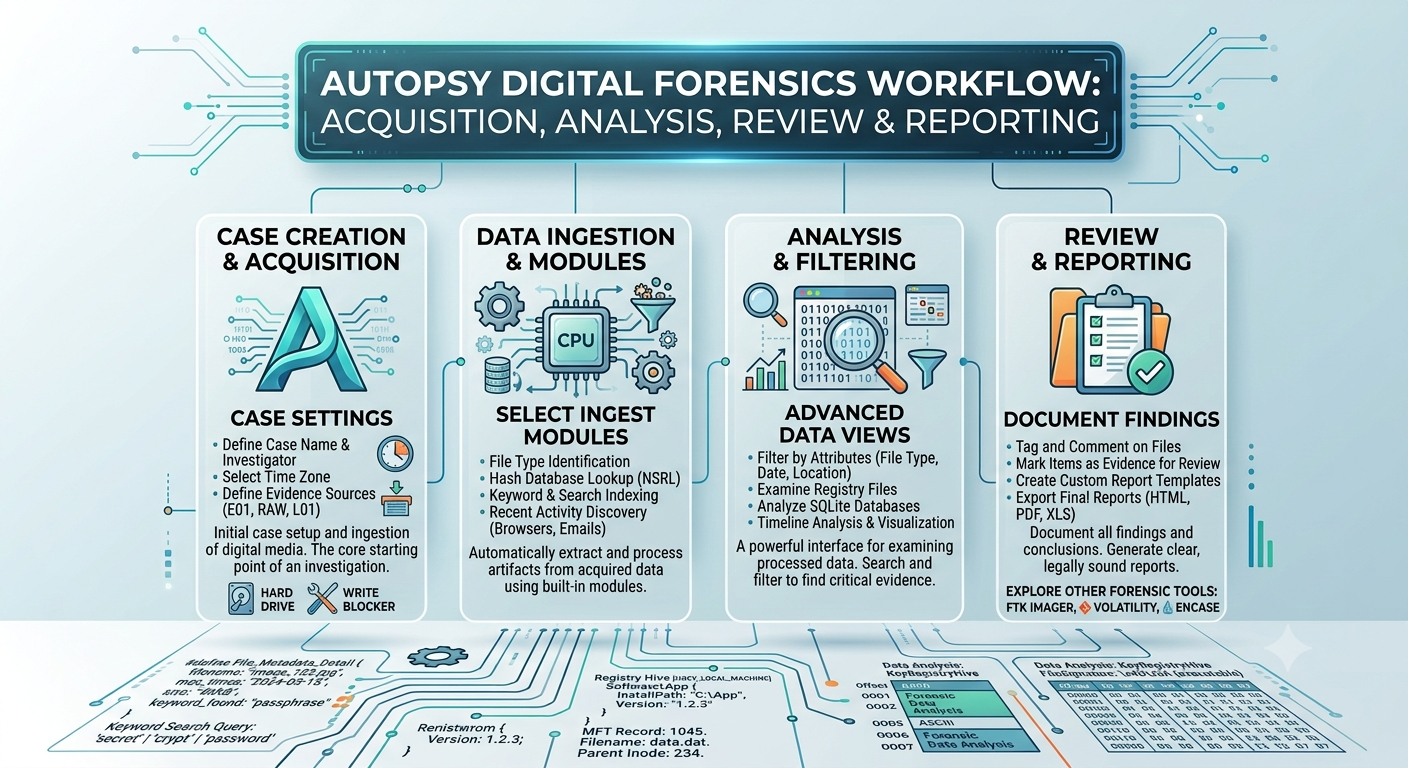
The official workflow describes five broad stages:
- Create a case
- Add a data source
- Analyze the source with ingest modules
- Perform manual analysis
- Generate a report
Conceptually:
Create Case
    ↓
Add Data Source
    ↓
Run Ingest Modules
    ↓
Review Results
    ↓
Investigate Evidence
    ↓
Tag / Bookmark Findings
    ↓
Generate Report
Each stage solves a different problem.
1. Creating a Case
A case is the container for an investigation.
Instead of treating every file as an isolated object, Autopsy organizes related evidence within a case.
A case can contain one or more data sources.
For example:
Incident Investigation
│
├── Workstation Image
├── External Drive Image
└── Collected Files
This becomes particularly useful when an investigation involves multiple sources.
The case provides the organizational structure around the evidence and analysis results.
2. Adding a Data Source
Once a case exists, the investigator adds the evidence to analyze.
Autopsy supports sources including:
- disk images
- local drives
- folders of local files
Supported disk-image formats include raw/dd and E01, with E01 support provided through libewf.
A forensic workflow often starts with an acquired copy of evidence, rather than simply opening an original device and changing its contents.
The purpose is to preserve the evidence while performing analysis against an appropriate forensic acquisition.
3. Ingest Modules: Autopsy's Analysis Engine
One of the most important concepts in Autopsy is the ingest module.
Think of ingest modules as specialized analysis components.
After a data source is added, ingest modules can process the data in the background and produce results that appear within the Autopsy interface.
Different modules answer different questions.
Data Source
     │
     ├── Hash Lookup
     ├── Keyword Search
     ├── Web Artifacts
     ├── Recent Activity
     ├── File Type Identification
     ├── Embedded File Extraction
     └── Other Modules
The result is a pipeline in which one large data source can produce many different categories of forensic information.
This is one of the reasons Autopsy can be much more useful than manually browsing folders.
Hash Lookup: Finding Known Files
Hashing is a fundamental technique in digital forensics.
A hash function produces a value associated with file contents.
Autopsy's Hash Lookup Module calculates MD5 hashes for files and uses configured hash databases to determine whether files are known, notable, or otherwise categorized. SHA-256 hashes are also calculated, although the documented hash-set lookup uses MD5.
Why is this useful?
Imagine a system contains thousands of standard operating-system files.
An investigator usually does not want to manually examine every known system file.
A hash set can help classify files.
Conceptually:
File
 ↓
Hash
 ↓
Hash database
 ↓
Known / notable / unknown
A known-good set can help reduce noise.
A notable set can flag files that deserve attention.
The important point is that a hash match is a classification signal—not automatically proof that malicious activity occurred.
Context still matters.
Keyword Search: Finding What Matters
Searching a large forensic image manually is inefficient.
Autopsy provides keyword-search functionality that can search indexed data.
Current documentation supports search modes including:
- exact match
- substring match
- regular-expression match
Searches can also be restricted to selected data sources.
Imagine an investigation involving a suspected data leak.
An examiner might need to locate references to:
project names
customer identifiers
domain names
email addresses
file names
specific terms
Keyword search can quickly reduce the search space.
However, search results should always be interpreted carefully.
A keyword appearing in a file does not necessarily prove that a person performed a particular action.
Forensic analysis is about connecting evidence, not treating every match as a conclusion.
Timeline Analysis: Reconstructing Activity
A filesystem contains timestamps.
Applications generate events.
Browsers record activity.
Files are created, modified, and accessed.
When these events are combined, investigators can build a chronological view.
Autopsy provides timeline analysis through a graphical interface designed to help identify activity.
A simplified investigation might look like:
09:14  File downloaded
09:16  Archive created
09:18  USB device activity
09:21  File modified
09:25  Browser activity
09:27  File deleted
Individually, each event may be unremarkable.
Together, the sequence may tell a much more interesting story.
This is why timeline analysis is such an important forensic technique.
Timeline ≠ perfect history
Timestamps are evidence, not an infallible recording of everything that happened.
Different timestamp types have different meanings.
Clock configuration, filesystem behavior, application behavior, timezone handling, and other factors can affect interpretation.
A good investigator therefore treats a timeline as something to corroborate, not blindly trust.
Web Artifacts: Understanding Browser Activity
Modern investigations often involve web activity.
Autopsy can extract web artifacts from common browsers to help identify user activity.
Depending on the available source and supported artifacts, this can help investigators examine things such as:
- browsing history
- downloads
- cookies
- search activity
- URLs
- other browser-related evidence
The broader idea is important.
A browser is not just an application.
It can become a source of forensic evidence about interaction with online services.
But interpretation matters.
A browser artifact may show that a URL or resource was recorded. Determining exactly who performed the activity and why requires additional evidence.
Registry Analysis
On supported Windows evidence, registry artifacts can provide useful information about system and user activity.
Autopsy's feature documentation describes registry analysis using RegRipper to identify information such as recently accessed documents and USB devices.
This is valuable because some activity is not obvious from ordinary file browsing.
For example:
User activity
    ↓
Operating-system artifacts
    ↓
Registry information
    ↓
Evidence about system usage
The registry is therefore one more piece of the forensic puzzle.
It should be interpreted alongside other evidence rather than used as a standalone source of truth.
Deleted Files and File-System Analysis
One of the most interesting aspects of digital forensics is that deleting a file does not necessarily mean that all traces disappear immediately.
Autopsy provides filesystem analysis capabilities through The Sleuth Kit and supports common filesystems including NTFS, FAT variants, exFAT, HFS+, ISO9660, Ext2/3/4, UFS, and others.
This allows investigators to examine filesystem structures and identify data that may still be relevant.
Forensic recovery is not magic, however.
Whether deleted data can be recovered depends on factors such as:
- whether storage space was reused
- filesystem behavior
- encryption
- device characteristics
- acquisition quality
- fragmentation
- other system activity
So:
Deleted does not always mean gone.
But neither does it mean that every deleted file can always be recovered.
File-Type Analysis: Looking Beyond File Extensions
A filename extension is not always enough to determine what a file actually contains.
A file named:
photo.jpg
might not actually contain JPEG data.
Autopsy includes file-type detection based on signatures and can identify extension mismatches.
This matters because forensic analysis should not blindly trust filenames.
The underlying bytes provide additional information about what a file actually is.
This is particularly useful when investigators encounter:
- renamed files
- suspicious extensions
- files with incorrect metadata
- unusual file structures
Embedded File Extraction
Modern documents often contain other files.
Archives contain files.
Office documents can contain embedded content.
Autopsy's Embedded File Extractor can process supported archive formats and certain Office document formats, sending extracted files back through the ingest pipeline.
This is powerful because it effectively expands the investigation surface.
Conceptually:
Archive
  ↓
Extracted files
  ↓
Hash analysis
Keyword search
File analysis
Other ingest modules
Instead of treating the archive as one object, Autopsy can expose its contents for additional analysis.
Email Analysis
Email can be an important source of evidence.
Autopsy includes email-analysis capabilities and can parse MBOX-format messages such as those associated with Thunderbird.
Email evidence can potentially help establish:
- communication patterns
- dates
- participants
- attachments
- subjects
- references to files or events
Again, context is essential.
A message is one artifact in an investigation, not automatically proof of every action described within it.
EXIF Metadata: More Than Just a Photograph
Images can contain metadata.
Autopsy can extract EXIF information from JPEG files, including information such as camera data and geolocation when such information is present.
That makes image metadata potentially useful in investigations involving:
- photographs
- device provenance
- timestamps
- camera information
- location clues
But metadata should be treated carefully.
It can be absent, altered, incomplete, or inconsistent with other evidence.
Tags and Bookmarks: Turning Findings Into Evidence
Large investigations can produce enormous numbers of results.
Finding something interesting is only the beginning.
Investigators also need a way to organize important findings.
Autopsy allows files to be tagged with arbitrary tag names and comments. Its reporting system can include tagged files and investigator notes.
For example:
Interesting File
      ↓
Tag: Suspicious
      ↓
Add comment
      ↓
Review later
      ↓
Include in report
This creates a bridge between automated discovery and human investigation.
The software can identify thousands of artifacts.
The investigator decides which artifacts matter.
Reporting: The Investigation Has to Be Explainable
A forensic investigation is not complete simply because an analyst found something interesting.
The findings need to be documented.
Autopsy includes an extensible reporting infrastructure. Standard reporting options include HTML, XLS, and Body File reports, with configurable content depending on the report type and investigation.
Reports can include information associated with:
- bookmarked files
- comments
- web history
- recent documents
- keyword hits
- hash-set hits
- installed programs
- attached devices
- cookies
- downloads
- search queries
This matters because forensic work needs to be reviewable and communicable.
A useful report allows another person to understand what was examined and what findings were considered important.
Autopsy vs The Sleuth Kit
These names are often confused.
They are closely related, but they are not exactly the same thing.
The Sleuth Kit
The Sleuth Kit is a collection of command-line tools and libraries for forensic analysis of disk images and filesystems.
Autopsy
Autopsy is the graphical digital forensics platform that provides a higher-level investigation environment around The Sleuth Kit and other tools.
A simple mental model is:
The Sleuth Kit
     ↓
Low-level forensic capabilities
     ↓
Autopsy
     ↓
Case management + graphical investigation workflow
This is an oversimplification because Autopsy also incorporates other components and modules.
But it is a useful starting point for understanding the relationship.
Why Ingest Modules Matter So Much
The modular architecture is one of Autopsy's most useful ideas.
Different investigations require different analysis.
A computer intrusion case may emphasize:
- recent activity
- browser artifacts
- hash lookup
- keyword search
- timeline analysis
A media investigation might focus more heavily on:
- images
- EXIF
- file types
- thumbnails
- metadata
A document investigation could emphasize:
- keyword searches
- embedded files
- metadata
- file relationships
The modular approach means the investigation can be adapted to the evidence and the question being asked.
Autopsy also supports third-party modules, extending the platform beyond its built-in functionality.
A Practical Example: Investigating a Suspected Data-Theft Incident
Consider a fictional scenario.
A company suspects that confidential project documents may have been copied from an employee workstation.
The investigation could conceptually proceed like this:
Step 1: Preserve and acquire evidence
A forensic image or other appropriate evidence source is prepared according to the organization's forensic procedures.
Step 2: Create the Autopsy case
The examiner creates a case to organize the investigation.
Step 3: Add the evidence
The relevant disk image is added as a data source.
Step 4: Run appropriate ingest modules
Potentially useful analysis could include:
- hash lookup
- keyword search
- web artifacts
- recent activity
- file-type analysis
- timeline-related analysis
Step 5: Search for relevant terms
The examiner searches for project names, filenames, domains, or other investigation-specific terms.
Step 6: Examine external-device evidence
Artifacts relating to USB devices may help establish whether removable storage was connected.
Step 7: Build a timeline
The examiner compares relevant file, browser, and system events.
Step 8: Review suspicious artifacts
Potentially relevant files are examined and tagged.
Step 9: Correlate evidence
The investigator compares multiple independent artifacts.
For example:
File activity
     +
USB artifact
     +
Browser/download activity
     +
Timeline
     ↓
Stronger investigative picture
Step 10: Generate a report
Relevant findings, comments, and supporting artifacts can be included in the final report.
Notice what Autopsy did not do.
It did not simply announce:
"Data theft occurred."
Instead, it helped organize evidence that an investigator could evaluate.
That is the correct mental model.
Autopsy Is Not a One-Click Investigation Tool
This is one of the most important lessons for beginners.
Installing Autopsy does not turn someone into a digital forensic examiner.
The difficult part of digital forensics is often not operating the software.
It is interpreting evidence correctly.
A result may be:
- incomplete
- ambiguous
- generated by automated processing
- affected by timestamps
- missing because a module was not run
- unrelated to the suspected event
- generated by normal system behavior
Autopsy documentation also notes that some results depend on the relevant ingest module having been run.
Therefore:
No result does not always mean no activity.
It may simply mean that the relevant artifact was not available or the necessary analysis was not performed.
Common Mistakes Beginners Make With Autopsy
Mistake 1: Treating every result as evidence of wrongdoing
A suspicious filename is not automatically malicious.
A browser history entry is not automatically proof of intent.
A hash match is not automatically proof of compromise.
Evidence needs context.
Mistake 2: Ignoring timestamps
A timestamp without understanding what it represents can lead to incorrect conclusions.
Mistake 3: Searching without a hypothesis
Keyword searching becomes more useful when the investigator understands what question is being tested.
Mistake 4: Running every possible module without thinking
More analysis can create more data and more noise.
The useful question is:
Which analysis techniques can help answer the investigation's specific questions?
Mistake 5: Forgetting the difference between artifact and interpretation
An artifact is something observed.
An interpretation is what the investigator believes that artifact means.
Keeping those concepts separate improves forensic reasoning.
Is Autopsy Free?
Autopsy is available as a free-to-download open source digital forensics platform. The official Autopsy site provides downloads for supported platforms and describes Autopsy as an end-to-end open source digital forensics platform.
The project also has commercial training, support, and related offerings from Sleuth Kit Labs.
For students and cybersecurity learners, the availability of an established forensic platform makes Autopsy particularly interesting as a way to learn how digital evidence is organized and analyzed.
Always obtain and analyze evidence only when authorized.
Where Autopsy Fits in a Cybersecurity Toolkit
Autopsy is not a replacement for every cybersecurity tool.
Instead, think of it as one component in a larger ecosystem.
A simplified DFIR environment might contain:
Endpoint / Disk Evidence
          ↓
     Acquisition
          ↓
       Autopsy
          ↓
 ┌────────┼─────────┐
 ↓        ↓         ↓
Timeline  Artifacts  Search
 ↓        ↓         ↓
Evidence correlation
          ↓
     Investigation
          ↓
        Report
Other tools may be better suited for:
- live endpoint collection
- malware analysis
- network forensics
- memory forensics
- threat intelligence
- vulnerability scanning
- security monitoring
Autopsy's strength is the structured analysis of supported digital evidence within a forensic case workflow.
Autopsy Features at a Glance
| Capability | What it helps with | |---|---| | Case management | Organizing an investigation | | Disk-image analysis | Examining acquired storage evidence | | Ingest modules | Automating analysis of evidence | | Timeline analysis | Understanding activity over time | | Keyword search | Locating relevant terms and patterns | | Hash lookup | Classifying known and notable files | | Web artifacts | Examining browser activity | | Registry analysis | Extracting useful Windows artifacts | | File-type analysis | Identifying files by content/signature | | EXIF extraction | Examining image metadata | | Email analysis | Parsing supported email artifacts | | Embedded-file extraction | Expanding supported archives/documents | | Tags | Organizing interesting findings | | Reporting | Documenting and sharing results |
These capabilities come together to form a workflow rather than a collection of unrelated buttons.
Should Cybersecurity Students Learn Autopsy?
For anyone interested in digital forensics, incident response, or DFIR, Autopsy is a worthwhile tool to understand.
It teaches several important ideas simultaneously.
Evidence is structured
Digital evidence is not simply "files on a computer."
It includes filesystem structures, metadata, application artifacts, timestamps, browser information, device traces, and other sources.
Automation has limits
Automated ingest can process large quantities of information, but human analysis remains essential.
Correlation is powerful
One artifact may be ambiguous.
Several independent artifacts pointing toward the same event can provide a much stronger investigative picture.
Documentation matters
A forensic investigation must be explainable.
Tools do not replace methodology
Knowing where a button is located is less important than understanding why a particular analysis technique is being used.
A Good Learning Path for Autopsy
Someone new to digital forensics does not need to begin with a complicated corporate incident.
A better progression is:
Stage 1: Learn basic digital-forensics concepts
Understand:
- evidence
- forensic images
- filesystems
- metadata
- hashes
- timestamps
- artifacts
- chain of custody
Stage 2: Learn Autopsy's interface
Understand:
- cases
- data sources
- ingest modules
- result views
- tagging
- reporting
Stage 3: Practice with safe datasets
Use intentionally provided forensic images or lab datasets.
The goal is to investigate known scenarios rather than experimenting on unauthorized devices.
Stage 4: Learn individual modules
Study:
- keyword search
- hash lookup
- timeline analysis
- web artifacts
- file-system analysis
Stage 5: Learn forensic reasoning
Ask:
What does this artifact actually prove?
Then ask:
What other evidence would support or contradict that interpretation?
This final stage is where tool usage turns into forensic thinking.
The Bigger Lesson Behind Autopsy
Autopsy is interesting not simply because it can find files.
Its real value is that it demonstrates how modern digital forensics turns a huge amount of raw information into an investigation workflow.
The progression looks something like:
Raw digital evidence
        ↓
Data-source processing
        ↓
Automated artifact extraction
        ↓
Search and classification
        ↓
Timeline and correlation
        ↓
Human investigation
        ↓
Documented findings
That pattern appears throughout cybersecurity.
Security tools can collect enormous quantities of information.
The difficult part is turning that information into something meaningful.
Autopsy provides a practical way to see that process in action.
Final Takeaway
Autopsy is best understood as a digital forensics investigation platform, not simply a file-recovery utility.
It brings together case management, data-source processing, ingest modules, filesystem analysis, keyword searching, hash lookup, timeline analysis, web artifacts, metadata extraction, tagging, and reporting.
Its relationship with The Sleuth Kit gives it a strong foundation in filesystem and forensic analysis, while its graphical interface makes complex investigation workflows more approachable.
For a beginner, the most important lesson is not memorizing every Autopsy feature.
It is learning to think like an investigator:
What happened?
What evidence supports that conclusion?
What does this artifact actually tell us?
What could be missing?
Can the finding be corroborated by another source?
That mindset matters far more than any individual tool.
Autopsy simply provides a powerful environment in which those questions can be explored.